Clarification
Clarification is the work queue for everything that needs your input to get through. On the left are the cases; on the right, for a selected case, you see what is behind it, what it means for the record and what you can do.
A case is a record waiting for a decision. Why a job ends up here at all and what an open case does is explained in the concept Clarification.
Permissions
The screen follows the Clarification permission:
| Level on Clarification | What you can do here |
|---|---|
| None | The Clarification menu item is hidden. |
| Read only | view, filter and page through all cases; the actions are hidden |
| Full | additionally reprocess, close, and move, set or confirm object links, individually and as a selection |
Next case is also available with Read only — the button moves through the list and leaves the case as it is.
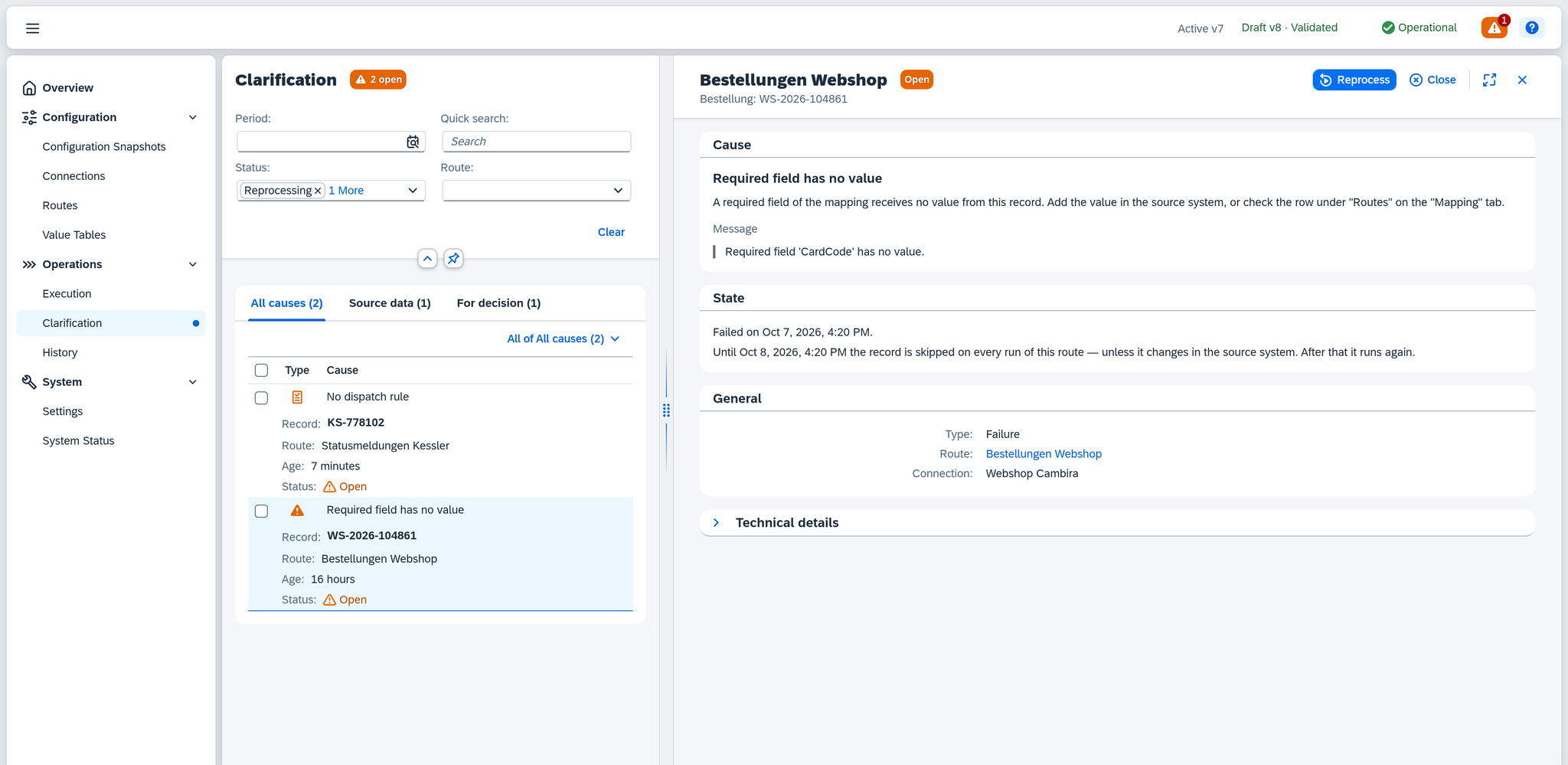
Layout
| Area | What it shows |
|---|---|
| Title (top) | Clarification, next to it a badge with the number of open cases, e.g. 31 open — it appears as soon as a case is open |
| Filter bar | period, quick search, status and route |
| Cause strip | one tab per cause group that occurs, for narrowing down quickly |
| Case list (left) | the cases for the current filtering, selectable one at a time or several at once |
| Details (right) | everything about the selected case and the actions for it |
The filters
The filters work together:
| Filter | Content |
|---|---|
| Period | when the case arose. Empty by default, so that even the oldest cases are in the list — the history, by contrast, starts with the last 24 hours. The options are the same as in History; with Last X Days, today counts as the first day. |
| Quick search | filters as you type. It searches the record (key and display value), the object and the error code; you narrow down by the text of the cause through the cause strip. |
| Status | multiple selection. Preset to Open and Reprocessing, that is, to what is still work. You see resolved, closed and superseded cases only once you add them. |
| Route | a route from the active configuration snapshot. The route's connection stands next to its name, because two routes can share a name. |
The filter bar's Clear button restores the preset — period empty, status Open and Reprocessing — not an empty filtering.
The filters you set are in the page address; a bookmark or a link you pass on opens the clarification with the same selection — see History — The filters are in the address.
The cause strip
Above the list there is one tab per cause group with its count, plus All causes. A click narrows down to that group.
The strip appears as soon as the cases come from at least two groups. If they all belong to one group, the list stands without it.
Every cause belongs to exactly one group, and the group says where to look:
| Group | Where the problem is | Where you look |
|---|---|---|
| Configuration | in the setup of the route | under Routes, on the tab the sentence for the cause names |
| Source data | in the record in the source system | in the source system, at the record from the Record column |
| Target system | in the system that was to accept the record | in the Target system's answer and in the target system itself |
| Connectivity | in the reachability of one of the components involved | at the component named — Service Layer or database |
| Internal error | in Xchange itself | in the Technical details; the information there is for support |
| For decision | in a pending decision | in the details of the case — see Cases with their own decision |
Which cause belongs to which group is under The causes.
The case list
Six columns, in this order:
| Column | Content |
|---|---|
| Type | an icon for Failure or Review; the label shows when you hover over it with the mouse |
| Cause | the short label of the cause, e.g. Required field has no value |
| Record | the record concerned — with its display value and, in grey below it, Key …, where the two differ; History explains what display value and key are |
| Route | the route the job ran under |
| Age | how long the case has existed |
| Status | Open, Reprocessing, Resolved, Closed or Superseded |
There is a checkbox in front of each row — use it to select several cases for a bulk action.
The icon in the Type column is orange for both types. The color says that the case is waiting for you; the shape says which type it is — a warning triangle for Failure, a clipboard for Review.
The type
| Value | Meaning |
|---|---|
| Failure | The job failed, and it needs a correction before it gets through. |
| Review | The job ran without errors and needs a decision to continue. |
Error code and Error class are in the technical details for the type Failure.
The status
| Value | Meaning |
|---|---|
| Open | The case is waiting for a decision. |
| Reprocessing | A reprocessing run is under way. If its run ends without resolving the case — e.g. because it was cancelled or the route is paused — the case is Open again. |
| Resolved | The record got through. |
| Closed | Someone took the case out of the work queue without processing it. |
| Superseded | A later job for the same record has overtaken the case. |
You can act on the first two; the other three are finished.
When there is nothing
The list stays empty in three situations:
| What it says | What it means |
|---|---|
| Nothing to clarify — "No entries match the current filter." | The current filtering leaves the list empty. Check the filters. |
| Data not available — "Service Layer currently not reachable — entries cannot be loaded right now." | The connection to the Service Layer is interrupted, so Xchange is not loading the cases right now. The cases themselves still exist. |
| Loading failed — "Failed to load entries." | Loading failed for another reason. The cases themselves still exist. |
On the right, in the details, there are two empty situations:
| What it says | What it means |
|---|---|
| No entry selected — "Select an entry from the list to view its details." | No case is open on the right yet; the list on the left shows the cases as usual. |
| Data not available — "Runtime store currently not reachable — entries cannot be loaded right now." | The connection to Xchange's own database is interrupted right now. The case itself still exists. If the Service Layer is gone instead, its sentence appears here as in the list. |
The details of the case
At the top, in the header, are the route's name and the case's status badge, below them the record's object and key, e.g. Order: WS-2026-104879; if the key is missing, a dash stands there. On the right of the header are the actions — see The actions — and the buttons for full screen and for closing the column.
The areas follow below. Four are there for every case; Fields to review, Deviations and Contents join them only for the causes that call for a decision of their own.
| Area | Content |
|---|---|
| Cause | the short label of the cause, the explanatory sentence for it and the Message or Target system's answer |
| Fields to review | only with Field conflict — see Field conflict |
| Deviations | only with a cause around the object link — see Object link |
| Contents | only with Divergent redelivery — see Divergent redelivery |
| State | in full sentences, where the case stands — see The state |
| General | type, route and connection; the route is a link into the route editor |
| Technical details | collapsed: error code, error class, reason, snapshot version, operation ID, message ID, correlation ID and Details, below them the link into the history |
The Reason field in the technical details shows the cause as a technical identifier, e.g.
RequiredValueMissing — it is meant for a support request. You find the readable text at the top
in the Cause area.
The link into the history is called → Open in history. With a Divergent redelivery it names the delivery it leads to, e.g. → Open delivery 2 in history.
The target system's answer
The label changes: if the cause belongs to the cause group Target system, the field is called Target system's answer — then the text really does come from there. Otherwise it is called Message, because then it is Xchange's own description. The field appears as soon as there is a text; for a Review, the Cause area usually stands without it. With Deadline exceeded and Write outcome unknown it is always missing, because there is no answer from the target system.
The state
The State area is made up of sentences, in this order:
| What it says | How it reads |
|---|---|
| Since when | "Failed on …", for a Review "Routed for review on …" — with the addition "after 3 attempts" if there were several |
| For which time | if the same record came into clarification before: "Case 3 for this record — first on …, last on …", plus "Always from the same cause." or "From changing causes." |
| Redeliveries | if the same message has come again since: "The message has since been redelivered once, on …" or "… redelivered 3 times, last on …"; if the case itself arose from a redelivery, "This is the first redelivery of this message." or "This is redelivery number 2 of this message." |
| Who ended it | for a finished case: "Resolved by A. Vogt on …", "Resolved automatically on …", "Closed by A. Vogt on …" or "This case was superseded by a newer entry for the same record." |
| What it means for the record | for an open case exactly one sentence, as the last — see below |
The last sentence depends on the situation:
| Situation | What it says |
|---|---|
| A reprocessing run is under way | A reprocessing run is under way. |
| Deadline exceeded or Write outcome unknown | While this case is open, the record is skipped on every run of this route — unless it changes in the source system. The operation ran into a timeout and may have written in part. Check the target system before you reprocess. |
| Without a deadline | While this case is open, the record is skipped on every run of this route — unless it changes in the source system. |
| With a deadline | Until Oct 8, 2026, 4:20 PM the record is skipped on every run of this route — unless it changes in the source system. After that it runs again. |
| Deadline expired | The record runs again on the next run of this route. |
A Review lets its record continue; it does not have this sentence.
The group hint
If there are two or more open cases with the same cause on the same route, the hint "31 open cases on this route share the same cause. Check whether one configuration change resolves them all." appears above the Cause area, with the link Show all 31. A click filters the list to exactly these cases.
Cases with their own decision
Three causes cannot be resolved by Reprocess alone — for them you decide in an area of its own in the details what applies.
| Cause | Area | What you decide |
|---|---|---|
| Field conflict | Fields to review | for each field, which side applies |
| Key contradicts object link, Search contradicts object link, Several target records | Deviations | for each point, which target record or target row the record is linked to |
| Divergent redelivery | Contents | whether the divergent content is processed as well |
Field conflict
A Field conflict arises when the source and the target system hold different values in a field without just one side having changed since the last synchronization, and the route's rule submits the field for review. The job then writes all other fields, leaves the submitted ones alone and ends with Manual review; how Xchange recognizes a conflict is described under Routes — Behavior. The Fields to review area shows one row per submitted field:
| Column | Content |
|---|---|
| Field | the field in the target system |
| Last synchronization | the value both sides held at the last synchronization |
| Now in … (first) | the value the source delivers now |
| Now in … (second) | the value that is in the target system now |
| Value to apply | your choice of which side applies for this field — one radio button for the source and one for the target system |
The two Now in … columns and the two radio buttons carry the name of their system. Where Xchange cannot name the systems, for example because the route no longer exists, the columns are called Now in the source and Now in the target system and the radio buttons Source and Target system. A missing value appears as —; under Last synchronization it means the two sides have never been synchronized in this field.
Fields of a list are grouped under their row, which carries a heading with list and key, e.g. Row "ARM-4711" in DocumentLines. If the target system deleted a row that the source changed, the row itself is submitted: Row deleted in SAP Business One, changed in "Webshop Cambira", with its fields below for reference, as the source delivers them now. If you choose the source, reprocessing creates the row again; if you choose the target system, it stays deleted. A list that Xchange compares as a whole has one row like a single field. Which list is compared how is under Lists.

In the example: order WS-2026-104864 of the route "Bestellungen Webshop". The last
synchronization was PP; the sales office set the payment method in SAP Business One to RG, and
the shop now delivers KK.
For this case, the two actions sit on the right of the Fields to review area's title; Reprocess and Close in the header are not shown:
| Button | What it does |
|---|---|
| Apply decision | reprocesses the job and in doing so writes exactly the fields for which you chose the source; where you chose the target system, its value stays. If the job gets through, the case becomes Resolved. Choose Webshop Cambira in the example, and the document then holds KK. |
| Keep all values in SAP Business One | reprocesses the job the same way, with the target system as the choice for every field, and sends nothing; Xchange first asks in the Keep all values dialog. If the job gets through, the case becomes Resolved here too. In the example, RG stays. |
The second button's name states the route's target system, in general Keep all values in …; where Xchange cannot name it, it is called Keep all values in the target system.
Apply decision needs a choice in every row. If one is missing, Xchange reports Value to apply not chosen for every field and processes nothing. A choice you have already made is there again the next time you open the case.
Both ways synchronize the field. Xchange records the values of both sides as synchronized; the same difference therefore does not submit the field again on the next run. Only when a side changes the field again does Xchange check it against the route's rule once more.
At most one Field conflict is open per route and record. It becomes Resolved only through the reprocessing that applies your decision. If another job for the same record gets through first, the case becomes Superseded — if that job submits fields again, a new case with the current list appears.
Object link
With Key contradicts object link, Search contradicts object link and Several target records, there is a Deviations area below Cause: a table with one row per point where the object link contradicts — the record itself or a linked row of a list. When these cases arise is explained in When the object link contradicts.
| Column | Content |
|---|---|
| Where | for the record, the step's target, e.g. Orders; for a row, the list and Source row … or, for an element, Element … with the link value, e.g. DocumentLines · Source row 3, below it the Target row … it is linked to |
| Search By | the fields searched by, with their values from the source, e.g. ItemCode: ARM-4711; empty for the record under Key contradicts object link, because no search runs there |
| Linked to | the values of the same fields in the linked record or in the linked row in the target system, with its key in small type below, e.g. DocEntry 4127 or Target row 3; none where there is no link yet |
| Found | likewise the values in the record or row found, with its key below; for several, the first three keys, followed by … and more if there are more, otherwise several records or several target rows, or nothing. Already linked elsewhere below it if the one found already belongs to another record — for several, Already linked elsewhere: with the keys of those already linked elsewhere |
| Decision | your decision for this point, see below |
The Linked to column also shows who decided last. Once the point is decided, Object link set or Object link confirmed (for a row, Row link …) stands below it with name and time. If a case comes up again and this point was decided once before, it says Last set or Last confirmed, likewise with name and time.

In the example: order WS-2026-104879 of the route "Bestellungen Webshop". The document with the internal key
4127 in SAP Business One now carries WS-2026-104879-B as its customer reference, so the lookup
by customer reference no longer finds anything. Only Confirm object link can be chosen — a link
cannot be moved to a record the lookup did not find.
The Decision column shows one of the following values, depending on the situation. If the lookup found at most one record or row, you choose with radio buttons; Move … is greyed out when it found nothing. If it found several, you choose in a dropdown list (Choose a decision, Choose a record or Choose a target row) that holds Confirm … at the top where a link exists, then the records or rows found:
| Decision | When it can be chosen | What happens |
|---|---|---|
| Move object link / Move row link | when a link exists and one or more were found | The link then points to the record or row found. For the record, the previous object link and its row links are discarded. |
| Set object link / Set row link | when there is no link yet and the lookup found several | The link then points to the record or row chosen. |
| Confirm object link / Confirm row link | only with Search contradicts object link | The link stays. Xchange keeps writing through it for as long as the lookup returns the same result. |
The dropdown list shows at most 100 records found — if the right one is not among them, narrow down Search By.
Accept decisions sits on the right of the Deviations area's title; Reprocess in the header is not highlighted for these cases. The button needs a decision in every row. If one is missing, Xchange reports Not every deviation decided and accepts nothing. Otherwise Xchange accepts all decisions together, reprocesses the case once and reports "Decisions accepted, processing started". If you confirm a row link, the note If you confirm a row link, reprocessing overwrites the row's key values changed in the target system with the values from the source. If another row already carries these values, saving fails and the entry returns to clarification. appears.
Xchange accepts either all decisions or none. It refuses with "The decisions could not be accepted." and states the reason if a link has changed in the meantime, the step has changed since the failure — then reprocess the entry so the lookup runs with the current configuration —, the record found is already linked elsewhere or — with Key contradicts object link — the target record is not readable or missing. Only what the lookup found can be set. For an older case without a stored deviation, only Reprocess and Close remain.
Whether the record that was set still exists in the target system only shows in the run: if it is missing, the job ends as Target record does not exist. There is no link without a run — Xchange sets the link and starts the run in one go, or it leaves the entry unchanged.
Divergent redelivery
With Divergent redelivery, there is a Contents area below Cause: both versions of the message side by side. Each column carries its delivery in the title, Delivery 1 and Delivery 2. Download gives you the complete version as a file; the preview below it shows it up to 1 MB. For a larger message only its beginning is shown, with the note Showing the beginning of the message. Use "Download" to get the complete message (3.4 MB). If the preview fails, its place says The preview could not be loaded. Use "Download" to get the message.
You decide here with the ordinary actions: Reprocess processes the divergent content, Close leaves it at the first delivery.
The actions
In the header of the details, Reprocess and Close are there for every open case — except for a Field conflict, whose actions sit in the Fields to review area. Next case appears as long as another case follows in the list.
Reprocess
Takes up the record once more — with the data that is in the source now, and bound to the active configuration snapshot. Xchange reports "Reprocessing started", and the case goes to Reprocessing; if the record gets through, it becomes Resolved. If you click while processing is still running, Xchange reports "Reprocessing is still running".
If the route of the case is no longer part of the active configuration snapshot, Xchange refuses: "This entry's route is no longer part of the active snapshot. Activate a snapshot that contains this route, then try again." If starting fails for another reason, it says "Reprocessing could not be started."
Close
Takes the case out of the work queue without processing the record. Xchange first asks in the Close entry dialog: "Close this entry and take it out of the worklist?". After Close the case goes to Closed, and Xchange reports "Entry closed".
Next case
Jumps to the next entry of the filtered list. After an action the case stays open, so that you can see that it took effect — you move on when you click Next case.
Several at once
Above the list there is a bar for bulk actions. What it refers to depends on whether a checkbox is set — the two scopes exclude each other:
| Checkbox set | No checkbox set | |
|---|---|---|
| What it shows | Selected: with the buttons next to it | a button with the narrowing and the count in its name, e.g. All of Target system rejected (31), which holds the actions in its menu |
| What it acts on | the checked cases | the narrowest narrowing currently set — a cause, otherwise the cause group, otherwise All causes — with its whole filtered set, including beyond the visible list page |
| Which actions | Reprocess and Close; Move object link and Confirm object link as soon as a case with a matching cause is included | the same |
A Field conflict in the selection has no choice per field. Reprocess takes the source's value for every submitted field, unless you have already chosen the target system in the case; Close works like Keep all values in … in the case — Xchange reprocesses the job with the target system as the choice for every field, and so synchronizes the fields. If the job gets through, the case becomes Resolved. Where the individual choice matters, open the case and decide there.
In a selection, links are moved only for entries with Key contradicts object link or Search contradicts object link in which every point has exactly one hit — if the lookup found several, as always with Several target records, choose in the individual case.
The confirmation
Before running, Xchange asks in a dialog — Reprocess entries, Close entries, Move object links (button Move) or Confirm object links (button Confirm) — and states:
| Item | When | What it says |
|---|---|---|
| How many runs result | for Reprocess | A bulk selection is processed in one run per route and processing type. With a single route it is one; with three, correspondingly more. |
| What is passed over | always | how many of how many the action takes, and, for each reason that has one, the way to resolve the rest after all — see the table below. If none fits, Xchange says so and changes nothing. |
| A different snapshot | for Reprocess | If entries come from an older configuration version, the confirmation points this out: processing uses today's configuration. |
| What happens to field conflicts | for Close | If the selection holds a Field conflict, the confirmation says that the values in the target system are kept. |
| How many points are decided | when moving and confirming | The decision applies the same way to every point of an entry, including each of its deviating rows — e.g. The action applies to 12 points in 4 entries. If one row is to be decided differently from the rest, decide the case individually. |
The reasons an entry is passed over
An entry passed over stays unchanged.
| Reason | Meaning | What you do |
|---|---|---|
| No longer open | The case has been finished in the meantime. | nothing |
| Route no longer in the active configuration | The active configuration snapshot no longer contains the route. | activate a snapshot that contains the route |
| Cause does not fit this action | The case has a different cause — e.g. Key contradicts object link when confirming. | choose an action that fits the cause |
| No deviation stored | An older case without a stored deviation. | reprocess or close the case individually |
| Object link changed in the meantime | An object or row link no longer points to the record or row the case names. | check the current link in the case |
| Record found is already linked elsewhere | Another record or row of the source is already linked to the one found. | settle in the case which link applies |
| Search found no unique record | When moving: the lookup found nothing or — in a selection — several records. | open the case and choose the right record there |
| Step changed since | The step was changed after the failure; the stored deviation no longer fits it. | reprocess the case so the lookup runs with the current configuration |
The result
If in the end every entry is finished, Xchange leaves everything as it is and says so. After Reprocess a strip with the result stays above the list; if exactly one run resulted, Open run leads straight to it. With several, the sentence states their number and leaves the link out. After Close a short message states how many entries were closed. If the action fails, it says "The action could not be carried out. Try again."
Over thousands of entries a bulk action takes a few seconds. While it counts or carries out the entries, the work queue shows a loading state; the rest of Xchange stays usable. If you click a second time meanwhile, Xchange reports Action already running and starts nothing. If carrying it out takes longer than Xchange waits for an answer, Action taking longer appears with "The action is taking longer than expected. Its result is not known yet — the list now shows the current state." — the action may already have taken effect.
The causes
Every case carries a cause, and every cause belongs to exactly one of the groups of the cause strip. On the detail page, each cause comes with a sentence saying what to do; the following tables say what is behind it.
Configuration
| Cause | What is behind it |
|---|---|
| Mapping failed | The step's mapping failed on this record — except for a required field without a value, which counts as Source data. |
| Step condition invalid | An error occurred while evaluating the condition that decides on the step. |
| Deletion marker invalid | The route's deletion marker could not be evaluated for this record, so it is undecided whether the record was deleted. |
| Target address unresolvable | The step could not determine which record in the target system to write. |
| Item endpoint not readable | Under Create or update, the step checks whether the record already exists before it writes, and the item endpoint cannot be read. Nothing was written; choose a different write intent. |
| Route no longer present | The route the job ran under was deleted after the case was created. |
| Dispatch rule invalid | An error occurred while evaluating a dispatch rule; the target is therefore undecided. |
| Key field not usable | Determining the key through the configured field failed. |
| List key not usable | The rows of a list could not be matched unambiguously through the configured list key: a row has no key, its key is not a single value, or two rows share one. |
| Elements cannot be told apart | The elements of the list could not be told apart through the configured element key: an element has no key, or two elements share one. |
| Unknown additional data | A key or search value of the step reads additional data the route does not have. Nothing was written. |
| Configuration version unusable | The snapshot the job is bound to now fails to load. |
| Configuration unreadable | The snapshot loads, but a stored part of the route's configuration cannot be read. Reprocessing alone fails on the same content; the job only goes through once the content is replaced and the version activated. |
Source data
| Cause | What is behind it |
|---|---|
| Source record unreadable | Fetching the record from the source system failed. |
| Additional data missing | Obtaining the data that the step reads in addition failed. |
| Source record altered | The record has changed since it was fetched; the prepared data is therefore out of date. |
| Fetched data missing | The fetched data of this job can no longer be retrieved. |
| Source record does not exist | The source system returned nothing for this key. |
| Deletion without stored record | The record was deleted at the source, but its last transferred version was not kept — it was transferred while the delete behavior was still set to Do nothing. Xchange wrote nothing. |
| Event without key | The event from SAP Business One lacks the key used to load the record. |
| Source search value missing | The field through which the target record is to be found is empty. |
| Required field has no value | A required field of the mapping gets no value from the record. |
Target system
| Cause | What is behind it |
|---|---|
| Target system rejected | The target system rejected the record; its answer is quoted verbatim on the detail page. |
| Deadline exceeded | Processing ran past its deadline while no write to the target system was in flight; the interrupted step sent nothing. Steps the job had completed before run again when you reprocess. |
| Write outcome unknown | A write call got no response from the target system. It may already have taken effect there and was therefore not sent again. |
| Target record does not exist | The step is meant to change an existing record with Update, and there is none under this key in the target system. Nothing was created. An ordinary job does not lead here — it ends as Skipped (not present). This cause arises only when an object link set in clarification points to a record that no longer exists in the target system: Xchange then neither creates a new one nor searches again, because either would silently override your decision. |
| Target system keeps throttling | The target system asked to wait for a whole day without letting a single call through. Waits spend no retries; only this bound ends the job. |
Connectivity
| Cause | What is behind it |
|---|---|
| Service Layer unreachable | The connection to the SAP Business One Service Layer failed. |
| Database unreachable | The connection to the database was interrupted during processing. |
| Record not retrievable | Reading the job's cached data failed. |
| Service Layer gave no cause | The Service Layer refused without naming a cause. |
Internal error
| Cause | What is behind it |
|---|---|
| Earlier step's result missing | A step accesses a result that is missing. |
| Aborted after the write | The record was created in the target system; only recording the completion failed. |
| Unexpected abort | Processing aborted in Xchange itself. |
| No automatic retry | The time of the automatic retry remained undetermined; the job was stopped. |
| Processing never completed | Processing was restarted several times and never finished. |
| Cause not determinable | The error belongs to an unknown class. |
For decision
| Cause | What is behind it |
|---|---|
| No dispatch rule | The record matches no dispatch rule of this route and was therefore not delivered. |
| Divergent redelivery | The same message arrived a second time, with different content. The first delivery stays unchanged — see Divergent redelivery. |
| Field conflict | The two sides hold different values in fields, and the route's rule submits them for review. Those fields were not written, all others were; the job ends with Manual review — see Field conflict. |
| Key contradicts object link | The record's key leads to a different target record than its object link, usually because it was changed at the source or the route's key source was switched. Nothing was written. |
| Search contradicts object link | The lookup finds a different target record than the object link, several, or none — for the record itself or for a linked row. Nothing was written. If several rows contradict, the list states the number of points, e.g. Search contradicts object link · 3 points. |
| Several target records | The lookup finds more than one target record, and the record has no object link yet. Nothing was written. |
Two causes sound alike and mean different things. With Source record altered, the record changed in the source system; with Divergent redelivery, a second delivery of the same message disagrees with the first.
What else applies
- The list is a work queue. What is here is waiting for a decision or is one that has been made. The complete history of a record is in History.
- A closed case is kept. Add the status Closed to the filter and it is back.
- Reprocess writes one more time. What has already been written in the target system stays there, and reprocessing may write it a second time. The three causes where this threatens — Deadline exceeded, Write outcome unknown and Aborted after the write — say so explicitly.
See also
- Resolve a clarification (guide) — the way from an open case to a decision
- Decide which side wins in a field conflict (guide) — the rule that submits a field conflict
- History (reference) — the job with all its steps
- Execution (reference) — the route the job ran under
- Routes — Behavior (reference) — the rules for field conflicts and how Xchange recognizes one
- Clarification (core concept) — what an open case does and how it ends