Writing to the target system
The mapping fills the fields of a record. Then it is finished, and one question remains: Does it already exist on the other side? This page explains where Xchange takes the answer from — and why a second record can be created in the process.
Changing needs an address
At first Xchange knows only what is in the message. Whether the order WS-2026-104877 already
exists as a document in SAP Business One is something it first has to find out.
This is where the two operations differ:
- Creating is addressed to the collection. "Create a new document" — the content is enough for that.
- Changing is addressed to a single record. "Change this document" — that requires its address in the target system, and that is its key there.
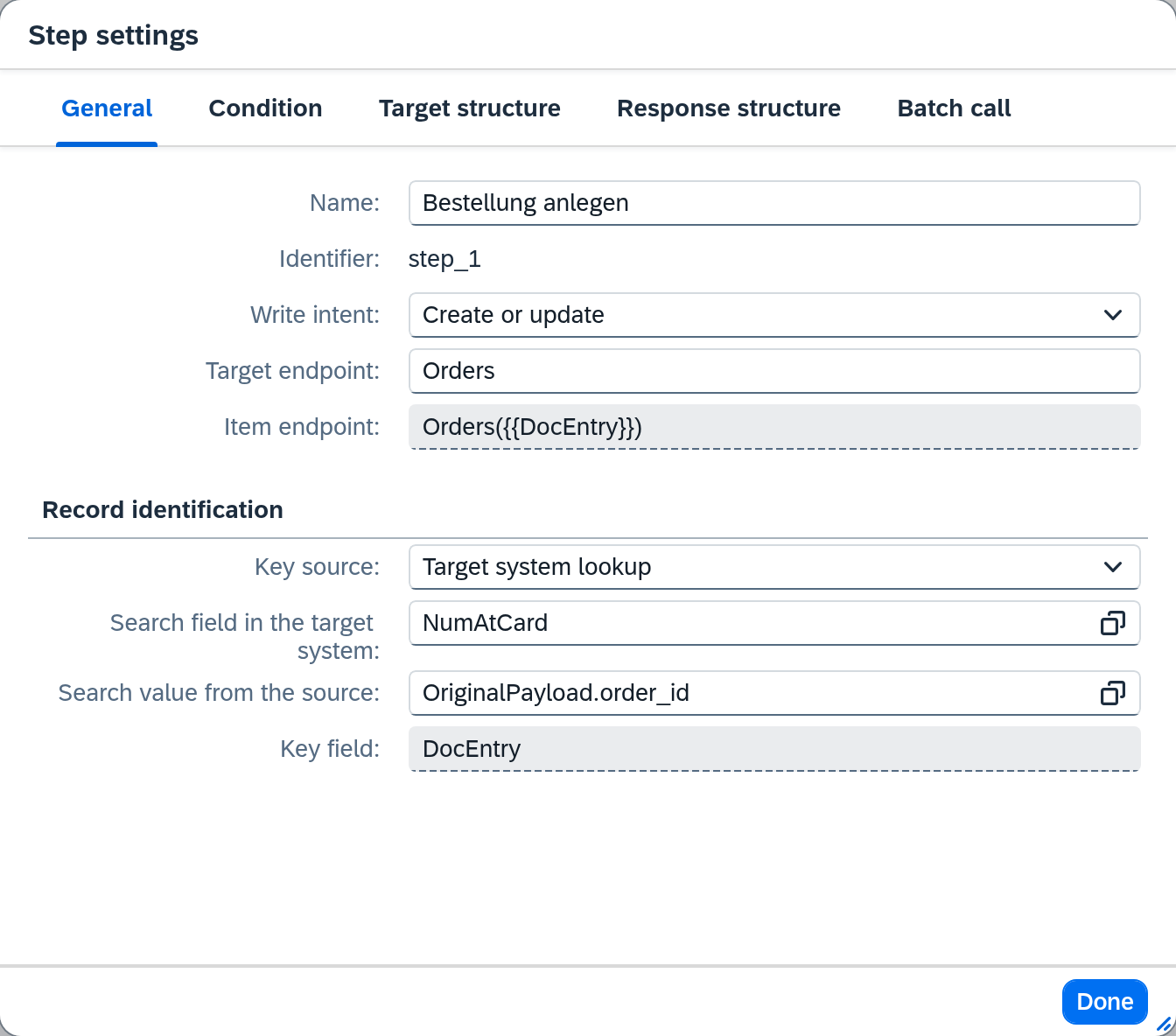
What a step is to do is stated by its write intent: Create, Update or Create or update. It is in the Step settings dialog together with the key source, which the gear icon above the mapping table opens. Both belong to the steps that write a record. A step in Execute mode only triggers an action in the target system and does without both.
You can also see the write intent without opening the dialog: the bar above the mapping table shows it on each step as a small badge. The key source is shown only in the dialog.
Where the key comes from
The key source answers exactly one question: how does Xchange know the address of the record in the target system? Two routes show the two ways that lie far apart in operation.
From the source data — "Artikel Cambira Austria". The item ARM-4711 is called ARM-4711 in the German
as well as in the Austrian company. The key source is set to Mapping or source, and the key
ItemCode takes its value from the mapping row ItemCode → ItemCode. The address is therefore
already in the record before anything is asked. A translation table is not needed — this is the convenient
case, and it has a precondition: that both sides use the same key.
From the target system — "Bestellungen Webshop". The shop numbers its orders itself, SAP
Business One numbers its documents itself. WS-2026-104877 remains the shop's number and
ends up in the field NumAtCard. Only SAP Business One knows the document's address — so it is
looked up, key source Target system lookup.
There are two further settings. Target system response takes the key from what the target system reports back after creating — this is how "Lieferaufträge Kessler" gets the number that the logistics partner assigned. No key stands for a step that does without an address.
Which settings are available depends on the step. Target system lookup and No key are always there. Mapping or source is offered by every writing step as soon as the write intent is Update or Create or update. Target system response is offered only by the primary step of a route that writes outward — that is, the step that writes the main object (see The basic model).
The address of a single record
A step knows two addresses. The target endpoint names the collection — that is where records are created. The item endpoint names a single record in it and carries a placeholder for its key. It appears as soon as the write intent is Update or Create or update.
An example with an invented user directory: users are created under users, and a single user is
found there at users/kscid:{{kscid}}. Then:
| Field | Value |
|---|---|
| Target endpoint | users |
| Item endpoint | users/kscid:{{kscid}} |
| Key source | Mapping or source |
Key kscid → Value | a field of the source data holding the customer number |
For every placeholder, a Key row with its Value sits below the key source. You choose the value
from the source data or, under Mappings, from a mapping row — then the value counts as the row
writes it to the target. Insert key next to the item endpoint puts the placeholder at the cursor
and creates the row along with it. For a REST target you may also leave the field empty; then the
address it suggests in grey applies. For SAP Business One the address is fixed, e.g.
Items('{{ItemCode}}').
The key is in the address only. Xchange inserts it into the item endpoint and does not also send it in the record. If it is to appear there as well, it needs a mapping row of its own — a row you choose as the Value is written anyway.
Update never creates. With the write intent Update, the step changes the record at this address. If there is none, Xchange writes nothing, and the step ends as Skipped (not present) — further steps still run. If the address came from an object link, Xchange discards it so that the next run searches again. If a REST target answers a missing record with success, that cannot be told apart from an update.
Create or update reads first. Xchange requests the record at the item endpoint. If it exists, it is changed; if the target system reports that it does not, it is created in the target endpoint. Any other answer creates nothing. If the item endpoint cannot be read at all, the job ends as Item endpoint not readable.
A changed key is not overwritten. If the record already has an object link and its key leads to a different target record, Xchange writes nothing. The job ends as Key contradicts object link — see When the object link contradicts.
The lookup before writing
When the key source is set to Target system lookup, Xchange asks before every write. Two
fields say what for: Search field in the target system names the field on the other side, Search value from the source
the value that is to be in it. For the orders this means: is there a document with
NumAtCard = "WS-2026-104877"?
The answer has three outcomes:
| What the lookup finds | What happens |
|---|---|
| Exactly one record | It is changed. Its address has been found. |
| None | A record is created — unless the write intent was Update, in which case the step ends as Skipped (not present). |
| More than one | Nothing is written; the job goes to clarification as Several target records. Two hits mean that the search fields identify the record ambiguously. |
With several hits, you decide which one is the right one: the case in Manual clarification shows the hits, and with Set object link the one you choose becomes this step's object link before the job runs again. If the search fields do not identify the record unambiguously in general, the lookup itself has to change.
A refused create asks once more. Between the lookup and the create, someone else may already have created the record on the other side. If the target system refuses the create, Xchange therefore looks once more, provided the target record can be looked up or addressed: if the lookup finds it now, it is changed under Create or update and noted as present under Create. If it finds nothing, the refusal stands.
A failed lookup always ends in clarification. If the target system does not answer at all or answers with an error, the job aborts and goes to Clarification. A timeout leaves open whether the record exists on the other side. If Xchange read it as "not found", every retry would create another record — and retries are the normal case.
The object link — what Xchange remembers
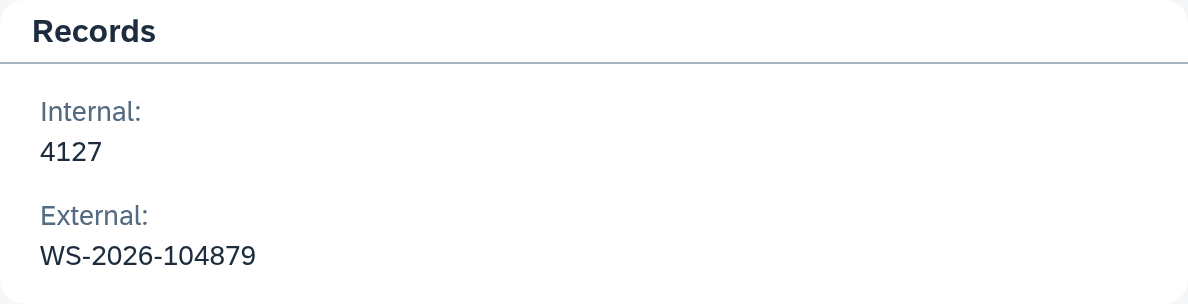
When a step has written a record, Xchange remembers the pair: which record here corresponds to which one on the other side. This note is called the object link and keeps two keys side by side — the Internal key in SAP Business One and the External key in the connected system.
The next time, it is read first. If the pair is there, Xchange knows the address immediately.
If a lookup is set up, it runs anyway — as a cross-check, see
When the object link contradicts. The detail page of a job in
History shows in the Records section which pair this job addressed. For the order WS-2026-104879 it shows the document with the
internal key 4127.
If an entry is no longer correct, Xchange corrects it itself. A record in the target system can be deleted there without Xchange noticing. If the target system reports on writing that the address points nowhere, Xchange discards the entry and goes the way a second time — this time through the lookup. If it finds no hit, a record is created under Create or update; under Update the step ends as Skipped (not present).
Each step keeps its own object link, provided it looks up or addresses its target record — a second step writing to another object therefore never lands under the first one's key. The detail page in History shows the key that this job's primary step addressed.
When the object link contradicts
An object link stays even when the records it connects change. An example: the order
WS-2026-104879 is linked to document 4127. If someone in SAP Business One changes this
document's customer reference to WS-2026-104879-B, the lookup for NumAtCard = "WS-2026-104879"
no longer finds anything — without a cross-check, Xchange would still write the next change of the
order into document 4127, and nobody would notice the deviation.
That is why Xchange checks the object link before writing, for every write intent except Create:
- With the lookup. If the key source is set to Target system lookup, the lookup runs even
when an object link exists. If it finds exactly the linked record, the write goes ahead. If it
finds a different one, several without the linked one, or none while the linked one still
exists, Xchange writes nothing. The job ends as Search contradicts object link — in the example
above on the next change of
WS-2026-104879. If the linked record no longer exists, the way from the previous section applies: Xchange discards the object link. - With the key. If the key source is set to Mapping or source and the record's key leads to a different target record, the job ends as Key contradicts object link.
An intended change does not block. For each object link, Xchange remembers the search values it was last checked with. If these values change in the source itself, the object link holds, the write goes ahead and the new state is remembered. The check applies only while the search values stay the same. If the search value is missing in the source, the object link holds as well.
The same cross-check applies to every linked row of a list — by its key, see Finding rows again by their link. If several rows contradict, one case arises with one point per row; if the record itself already contradicts, Xchange no longer checks the rows.
In Clarification you decide per point which one is right, and accept all decisions at once:
| Decision | What happens |
|---|---|
| Move object link | The object link then points to the record found. The previous object link and its row links are discarded. |
| Confirm object link | The object link stays. Xchange remembers what the lookup found and keeps writing through the object link for as long as the lookup returns the same result. Only with Search contradicts object link. |
| Move row link | The source row is then linked to the row found. |
| Confirm row link | The link stays. The source values are written into the row and overwrite a change in the target system. |
Afterwards the job is reprocessed once.
Jobs that delete a record or remove it from the data filter are exempt from the check — the deletion reaches the record the object link names.
Why a second one can still be created
All three cases lie in the setup of the route.
The write intent is set to Create. Then a record is created, every time, without asking. That is the right setting for a document that is created exactly once — and the wrong one for an item master record that keeps coming. How you check this for a route is described under Avoid and investigate duplicates.
The record's search field is empty. The key source is set to Target system lookup, the write intent to Create or update, the route seems protected — but the search field of the individual record is empty. Then Xchange creates, unchecked. On the next delivery of the same record the same happens. If, on the other hand, the write intent is set to Update, the job aborts with a message.
The search field hits the wrong record. A search field that several records can carry — a name, a postal code — finds, with one hit, the supposedly right one and writes into it. The result is an overwritten foreign record instead of a duplicate. With two hits the abort described above applies; a single hit counts as the right one.
What is decided elsewhere
- What is in the fields is decided by the mapping, row by row.
- Whether a record is transferred is decided by the route's data filter and conditions.
- When writing happens is determined by the trigger — see Triggering.
See also
- Avoid and resolve duplicates (guide) — how you check whether a route is protected, and what you do in a suspected case.
- Routes — Mapping (reference) — write intent, key source and the search fields in detail.
- History (reference) — where you find a job, its outcome and its object link again.
- Mapping (core concept) — how the record that is written here comes about.