Mapping
A route says what is transferred, its triggering says when. The mapping answers the third question: which field goes to which — and what happens when the value is missing.
One row, one target field
The mapping is a table. Each row names a target field on the left and on the right what goes into it. For the route "Bestellungen Webshop" it reads like this:
| Target field | Source |
|---|---|
CardCode | OriginalPayload.customer_no |
NumAtCard | OriginalPayload.order_id |
PaymentMethod | OriginalPayload.payment |
On the screen the right column is called Source, because something other than a field can stand there as well.
Three kinds of what can stand on the right
A source field. The normal case: OriginalPayload.customer_no reads the field customer_no from
the shop's message. The cell shows a path, and a tree helps with the selection.
A constant value. Every cell starts with a small toggle; its tooltip says Field reference versus Constant value. When the cell is set to constant, you type the value in yourself — text, number or Boolean value. A target field that is to contain the same for every record does without a source field.
A self-generated value. Some transformations do without a source: a timestamp of the moment, a new identifier, a case distinction that picks the matching value from several conditions. For these rows the source cell disappears, and in its place stands what generates the value.
Four questions for a single field
Tapping the row opens its detail. Four tabs are there, and they are in the order in which they take effect.
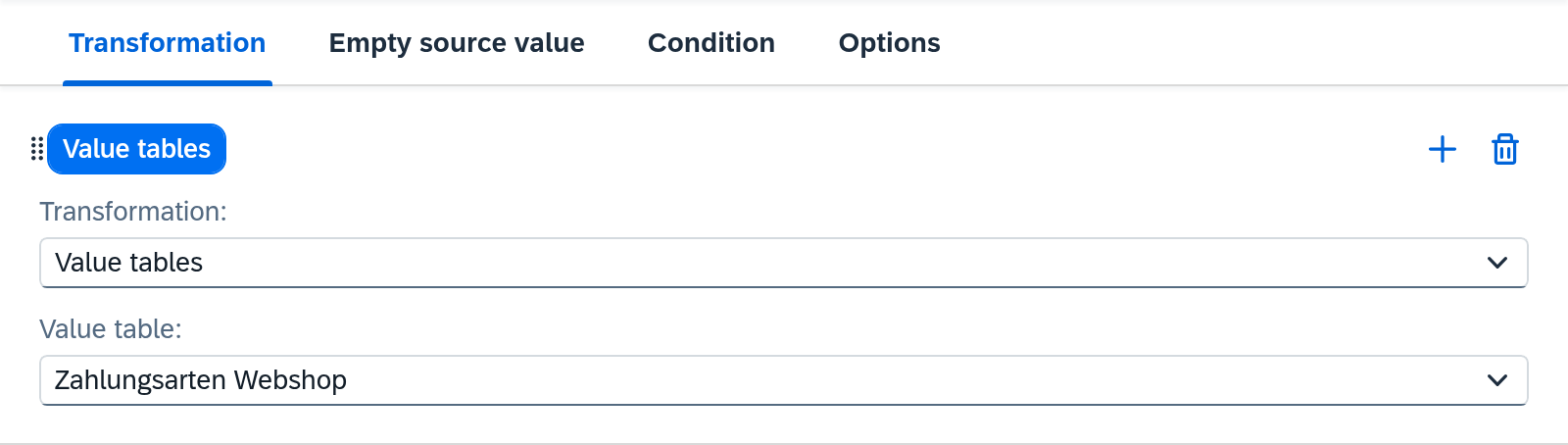
Transformation — the way in between
Some values change on the way. The shop writes paypal, SAP Business One expects
PP; this key conversion is in a value table, and the
mapping row looks it up there.
A row can carry several transformations one after another; each receives what the previous one
returned. This is also how a target field is built from several parts — the
order reference for Kessler, for example, which grows together from the fixed text CAMBIRA_DE- and the key of the
delivery, 80234 — built in
Build a target field from several source values.
Which transformations exist and what each one requires is described under Routes — Mapping.
Empty source value — when nothing arrives
A source field that is missing from the message is the most common reason a mapping works differently than expected. The row itself decides what applies then, and all three options say something about the outgoing message: the field goes out empty, it is missing from it entirely, or it goes out with an explicit null value. What the target system then does is its own business — Xchange only decides what is in the message. What the three settings are called is described under Routes — Mapping.
Before that, a fallback value for an empty source value can be set: if nothing arrives, it steps in. If it stays empty too, one of the three options applies again.
Only rows that actually read carry this tab. A constant and a self-generated value are always filled, and the UI hides the question there.
Condition — whether the row takes effect at all
A row can be tied to a condition and then writes only when it applies. Otherwise the field is missing from the message, as if the row did not exist.
Options — whether the field is needed
Here a target field becomes a required field, in two variants: technical, when the target system requires this field, and business, when your organization insists on it. In effect the two are the same — both abort the mapping. When an abort happens, you can tell from it whether the target system requires the field or your organization.
The four interlock
On October 7, 2026, at 4:20 PM the order WS-2026-104861 came in without customer_no.
CardCode is mapped as a required field, so Xchange aborted the mapping instead of writing a
document without a business partner. The job is in
Clarification, cause Required field has no value in the cause group
Source data — because the value was missing in the record, the mapping itself is fine.
Here the second and the fourth tab are connected: the required check looks at whether the target field carries a value — that alone is what counts. An empty text and an explicit null value count as missing. That is why none of the three settings under Empty source value protects a required field: if the source value is missing, the mapping aborts, whether the field would go out empty, not at all or with a null value. Only a fallback value that actually delivers something can step in.
The third tab intervenes at the same point, only the other way round: a row whose condition does not apply is skipped by the required check. A required field that applies only under a condition is therefore set up through the condition, and you leave the requirement switched on.
When the target holds a list
A document consists of a header and its lines, and the lines are a list. In the mapping table there is a single row for it; tapping it leads one level deeper, where the fields of a line have their own table — with the same four questions for each field.
For the orders, OriginalPayload.lines[*] becomes the list DocumentLines: each entry
of the source becomes a line of the document. A list can also get its rows in other ways, and it
can carry an additional row that does without a source entry. Both are described under
Routes — Mapping.
The shipping costs of the orders are such a case. The shop sends them as one amount in the header,
shipping_total, not as a line. An additional row "Fracht" in the same list turns it into a line:
item FRACHT-PAUSCHAL, quantity 1, price from OriginalPayload.shipping_total.
The key of a list
On a create every line is new. On an update the record in the target already has lines, and Xchange has to know which of them a line from the source means. That is what the key of the list says: one or more fields of an entry, which you mark with the key icon inside the opened list. Whether Xchange searches for a row by its key is set in its list settings under Search By: Marked Fields or Do Not Search.
In "Bestellungen Webshop" that is ItemCode. When order WS-2026-104877 arrives a second time,
Xchange reads the existing document before writing, finds the line with ARM-4711 in it and
changes its quantity. A line with an item the document does not have yet is appended — or fills an
empty row when the list fills empty rows with new rows under
Empty rows. Lines that
exist only in the target stay as they are — unless the list changes them under
Existing rows. Nothing is deleted.
What applies:
- Only with SAP Business One as the target. The reconciliation applies to import and internal routes and to export routes to an SAP Business One connection. Any other target receives the list as it is mapped; there is neither Search By and Link By nor the key icon.
- Without a search, lines are appended. When Search By is Do Not Search, every line from the source is added again on an update — unless its link finds it again (see below). That can be intended, e.g. for a list that only grows.
- The key belongs to the target list. When several lists write into the same target list, one key applies to all of them, and each of them has to map its fields. The same holds for Search By, Link By, Empty rows and Existing rows.
- An additional row is found by the key, too. The row "Fracht" maps
ItemCode, and Xchange finds the freight line again byFRACHT-PAUSCHAL. - The comparison is exact. Upper and lower case count, and a key that differs from an existing
line only in that —
Arm-4711againstARM-4711— counts as ambiguous. - What is ambiguous is not written. An empty key field, the same key twice in the source or twice in the target, the same link value twice in the source: the record goes to Clarification, and the message names the field and the row. Twice in the target counts only among the rows not linked to a row of the same message.
- If the existing record cannot be read, nothing is written — not even appended as a fallback. If someone changes the record between the read and the write, Xchange reads it again on the next attempt, provided the target system lets such changes be detected.
Finding rows again by their link
A key depends on fields, and fields change — in the source as well as in the target. If the key of a line changes, Xchange no longer finds it, and the next run appends a second one. Link By closes that gap: it names a field of the source entry that identifies it uniquely in the source system — its value is the link value. After writing, Xchange remembers which row in the target belongs to which link value, and on the next run finds it again by that link — whatever has changed in its fields.
Suppose the shop in "Bestellungen Webshop" sends an identifier of its own with every line,
line_id, and the list settings of DocumentLines name it under Link By; the key stays
ItemCode. The document for WS-2026-104877 was created before this setting, so its line with
ARM-4711 is not linked to anything yet.
- The order arrives again unchanged. Xchange finds the line by
ItemCode, updates it and links it to itsline_id. - The customer swaps the item. In the shop they replace
ARM-4711withARM-4712; the line keeps itsline_id. ByItemCodeXchange would find no line withARM-4712and would append a second one. The link finds the existing line, and Xchange writes the new item into it.
For each row from the source, Xchange searches in this order:
- Link — the row in the target already linked to this link value.
- Key — with Marked Fields, the row with the same key, among the rows not linked to another row of the same message.
- Append — if none is found, the row is added.
Afterwards Xchange links every written row that carries a link value. So the link takes effect only on the run after that: had the item been swapped before the first link, the line would have been appended.
What applies:
- A row is taken only by a row of the same message. If it is linked to a link value the message
no longer carries, the key finds it again and Xchange links it anew. If the customer deletes a
line in the shop and adds it again, it gets a new
line_id; Xchange finds the old line byItemCodeand updates it instead of appending a second one. - If the linked row is missing in the target, the key applies again. If it was deleted in SAP Business One, Xchange discards the link and searches by the key; if that finds nothing, the row is appended.
- The link is cross-checked against the key. If Search By is set to Marked Fields, Xchange
also looks up the key of a linked row. If someone in SAP Business One changes the item of the
linked line to
ARM-4713while the order still namesARM-4711, the key finds a different row, several or none. Xchange then does not write the record at all and puts it into Clarification as Search contradicts object link — with one point per deviating row. If the key changes in the source instead, as with the item swap above, the link holds and Xchange remembers the new key. - An empty link value links nothing. The row is found by the key or appended, as without Link By.
- With Do Not Search only the link carries. A row without a link value or without a stored link is appended again on every run. Validate points this out.
- Only on the primary step, and only where rows can be linked. Lists whose rows SAP Business One gives an identifier of their own can be linked, e.g. the lines of a document. On other lists the UI does not offer the Link By field.
What is decided elsewhere
- Whether a record is created or updated is determined by the step's write intent — see Writing to the target system.
- How the target system recognizes the record is determined by the key source — also there.
- When something runs is determined by the route's trigger — see Triggering.
See also
- A field is missing in the mapping (guide) — when the target system requires a field that is missing in the mapping.
- Routes — Mapping (reference) — every transformation, every setting of a row and the structure of a list in detail.
- Value Tables (reference) — how a key conversion is created and maintained.
- Writing to the target system (core concept) — what happens to the finished record once all fields are filled.