Settings
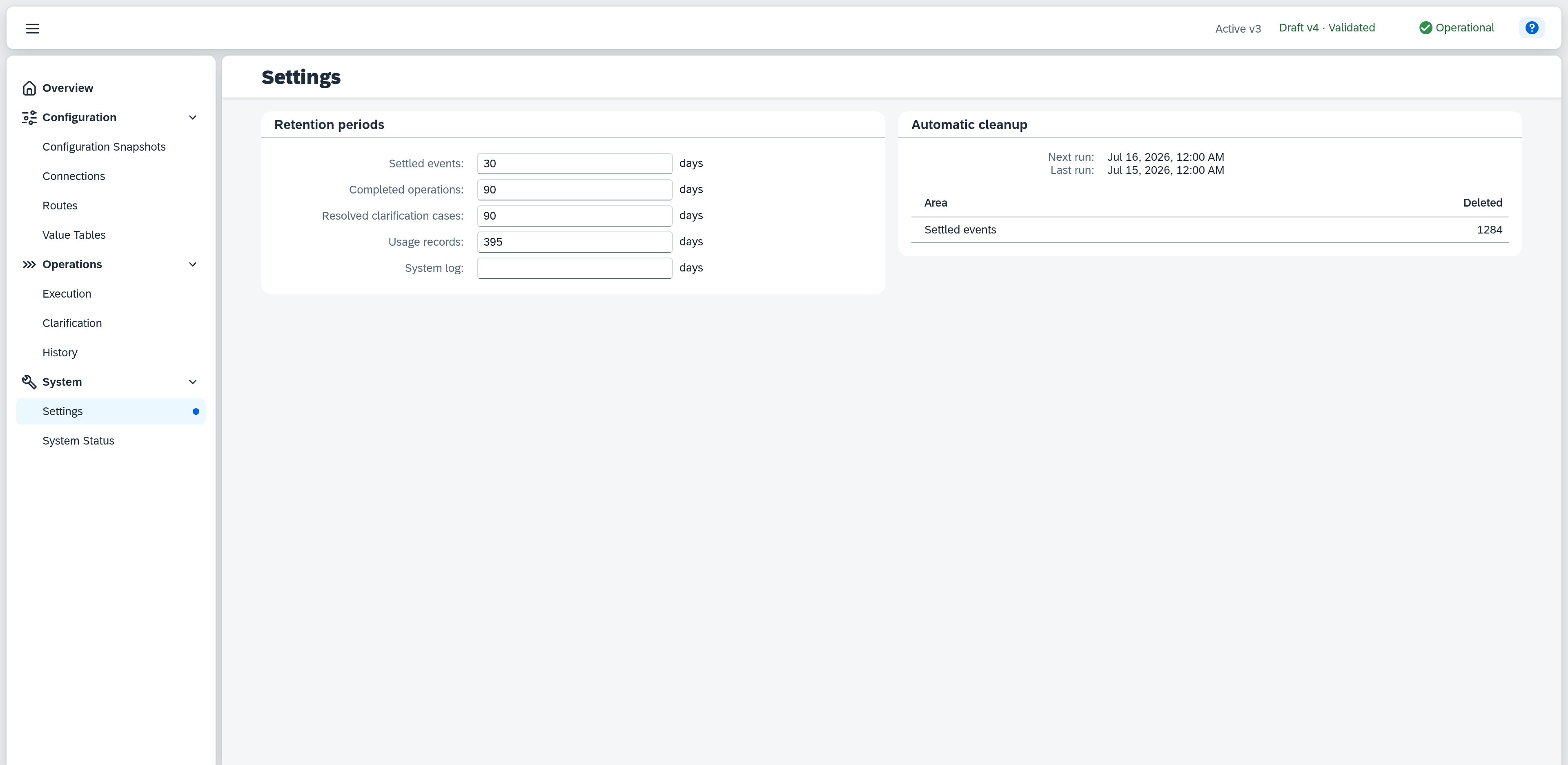
Settings collect the operational parameters of Xchange — values that apply to the whole installation and are not part of a configuration version. Today it holds one group: the retention periods of the processing data, together with the deletion record of the last cleanup.
The page is not part of the configuration version. A change therefore takes effect immediately and needs no activation — unlike connections, routes and mappings, there is neither a draft nor a check here.
Permissions
The page is visible as soon as you hold the System permission (read or full). At the read level you see the periods and the deletion record but cannot change the periods; the input fields are then not editable. Changes require the System permission at the full level.
Retention periods
A period decides how long Xchange keeps a record. The automatic cleanup then deletes whatever is older.
| Field | Applies to | Default |
|---|---|---|
| Settled events | The event queue: change notices from SAP Business One, once they have been processed. | 30 days |
| Completed operations | Finished operations and their synchronisation runs. | 90 days |
| Resolved clarification cases | Failed operations and the clarification cases they raised. | 90 days |
| Usage records | Records of licensed usage. | 395 days |
| System log | Entries in the system log. | empty — not set |
Every period counts in days. The default of 395 days for usage records covers a full year of licence reporting; a shorter period discards records that can no longer be reproduced.
The system log is the only field that ships empty. How far back a log has to reach depends on how long you want to be able to reconstruct an incident — Xchange does not make that decision for you, and until you enter a period the log is not deleted.
Input
An empty field means the records are never deleted automatically. That is not a missing value but a valid setting: clear a field and the corresponding area is left untouched from the next cleanup on.
Xchange saves every entry automatically; there is no save button. The footer shows the state of the save and hides itself again once the entry is stored. Ctrl+Z undoes a change, Ctrl+Y restores it.
Xchange reports three entries right at the field:
| Entry | Message |
|---|---|
| anything that is not a whole number | "Whole numbers only" |
| 0 or a negative value | "At least 1 day" |
| more than 36,500 days (100 years) | "At most 36500 days" |
The message appears only after you have left the field, and disappears with the next character that makes the value valid again. While the message stands, the cleanup skips that area and deletes nothing there.
Shortened periods
If you shorten a period, a warning appears above the form listing every affected field with its old and new value on a line of its own: "Shortened periods — older records are deleted on the next cleanup: • Settled events: 30 → 14".
The warning appears once the new value is saved — not while you are still typing. It names no date: that stands on the right under Automatic cleanup. Shortening does not delete immediately but with the next cleanup — until then it can be taken back without consequence. The warning refers to the state you opened the page with, and disappears again as soon as you write the original value back.
Automatic cleanup
The date of the next cleanup and the deletion record of the last. The run is scheduled and happens by itself; it cannot be started from this page.
| Field | Note |
|---|---|
| Next run | Date of the next scheduled run. Where no run is scheduled, it reads Not scheduled. |
| Last run | Time at which the last cleanup took place. Where it deleted nothing, that stands behind it. |
As long as no run has taken place, only the next date stands there; Last run appears with the first run.
Below it, a table lists per area how many records the run deleted. The areas are the same as the periods on the left and stand in the same order — "Completed operations" counts the operations and their synchronisation runs together, "Resolved clarification cases" the failed operations and their clarification cases.
The table lists only areas in which something was actually deleted. A missing area therefore means that nothing there was older than its period — or that the period is not set at all. Where the whole run deleted nothing, that stands right behind the time: "Sep 6, 2026, 5:50 PM — no records deleted".
A run deletes at most a fixed number of records in one go, so that it does not load the database for hours. When it reaches that limit, the page reports "The run reached its batch limit and continues with the next run." — the backlog is worked off further at the next run, without anything for you to do.