Routes — Behavior
The Behavior tab determines what a route does in two situations that do not follow from the single record: when a field was changed on both sides, and when a record no longer applies in the source. It exists only on routes of the type Processing; a dispatch route transfers nothing itself and therefore has neither conflicts nor a delete behavior.
Permissions
The tab belongs to the route and therefore follows the Routes permission:
| Level on Routes | What you can do on the tab |
|---|---|
| None | the Routes menu entry is missing, and this tab with it |
| Read only | view conflict rules, delete behavior and deletion marker; the fields cannot be changed, Add condition and Remove condition are missing |
| Full | change everything, add and remove conditions |
Layout
| Area | Content |
|---|---|
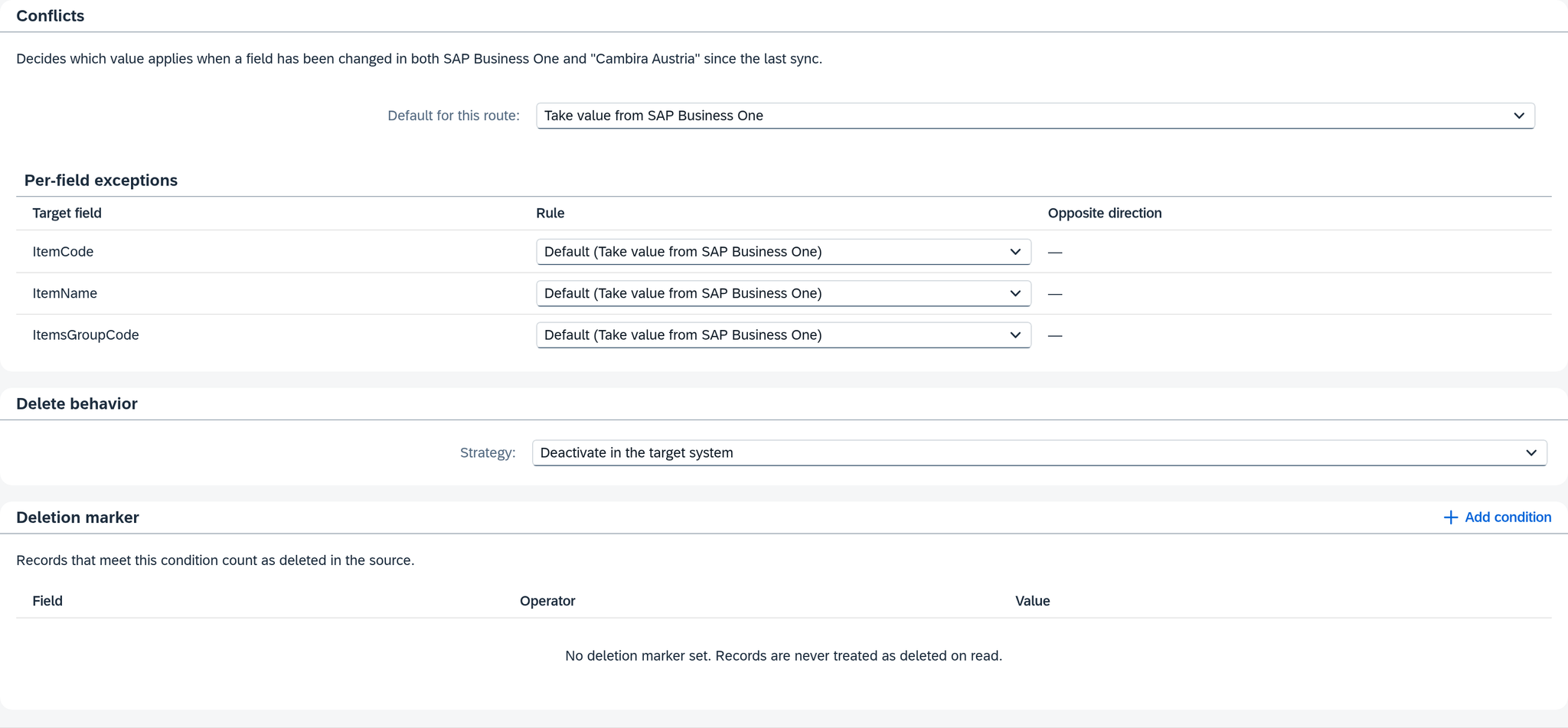
| Conflicts | which side wins when a field was changed in the source and in the target system: a default for the route and, below it, a rule per field. |
| Delete behavior | the Strategy field: what the route does with a record that no longer applies in the source. |
| Deletion marker | the condition by which the route recognizes a record deleted in the source. Empty as long as the source does not flag deletions. |
In the example: For "Artikel Cambira Austria", the value from SAP Business One applies to all three fields. The route is set to Deactivate in the target system, and its deletion marker is empty — SAP Business One does not flag a deleted item, it is simply missing.
Conflicts
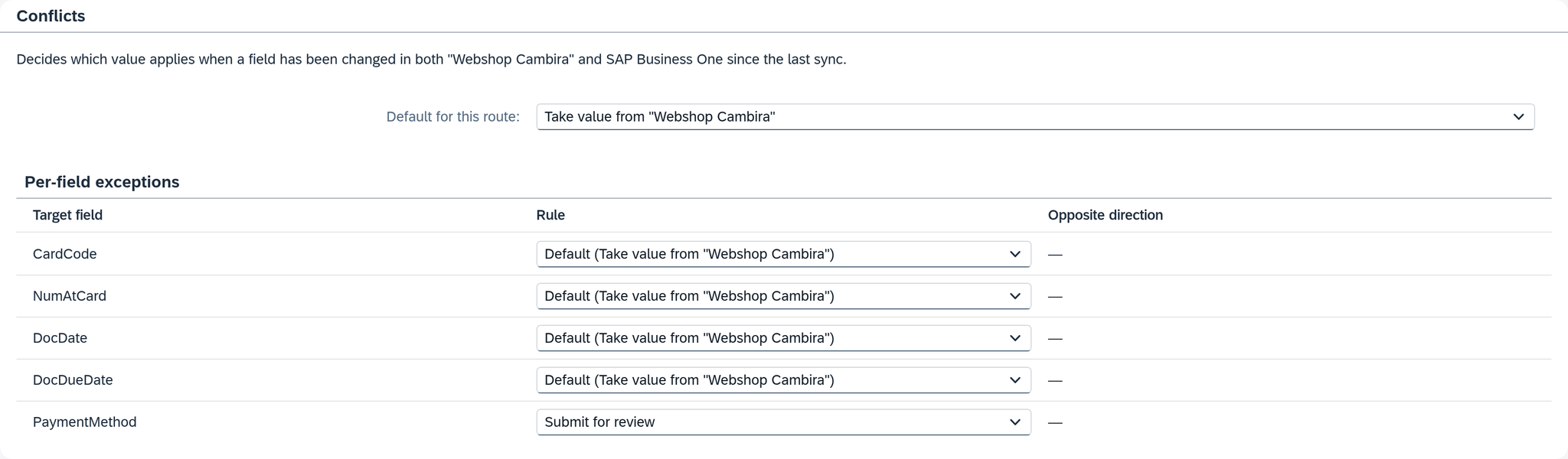
A field can change on both sides: in the source that delivers it, and in the target system, where someone corrects it by hand. Without a rule, the route writes the source value and thereby overwrites what was changed in the target system. This section determines whether it stays that way. Below its title stands what it decides, with the names of both systems — on "Bestellungen Webshop": "Decides which value applies when a field has been changed in both "Webshop Cambira" and SAP Business One since the last sync."
A conflict exists when the source and the target system hold different values in a field and not just one side has changed since the last synchronization. How Xchange determines this — also for a record that has no last synchronization yet — is described under How Xchange recognizes a conflict.
If the section is missing, Xchange could not read which fields can run into a conflict when the route was opened. The rules you set are kept and still apply; the next time the route is opened, Xchange asks again.
The rules
| Rule | Effect |
|---|---|
| Take value from … | The source always wins. Xchange compares nothing and reads nothing from the target system for it — the route behaves like one without a rule. |
| Keep value in … | In a conflict, the value in the target system stays as it is. The other fields of the record are written. |
| Submit for review | In a conflict, Xchange does not write the field and submits it to Clarification. The other fields are written, and the job ends with Manual review. |
Instead of the ellipsis, the selection shows the names of the two systems — on "Bestellungen Webshop", that is Take value from "Webshop Cambira" and Keep value in SAP Business One.
Default for this route applies to every field that has no rule of its own. The preset is Take value from ….
Per-field exceptions lists the fields that can run into a conflict:
| Column | Content |
|---|---|
| Target field | the field in the target system |
| Rule | Default (…) — in parentheses the rule the default currently sets — or one of the three rules for exactly this field. On a list that the target system replaces as a whole, and on its fields, only Take value from … is offered. |
| Opposite direction | the route that transfers the same field in the opposite direction, with the rule that applies there. If it describes the same object through the same field, it shows "Route: Rule" as a link to its Behavior tab; if it reaches the field through other fields, it shows the name of the route and "via" with those fields. "—" means that no route writes the field back. |
Set up the opposite direction so that both routes want the same thing: if both keep the value in the target system, a change to this field is no longer transferred in either direction — a message on both routes points this out.
In the example: Suppose A. Vogt has set Submit for review for PaymentMethod on "Bestellungen
Webshop"; the default stays Take value from "Webshop Cambira". The payment method is the one field
the back office changes afterwards in SAP Business One — after a phone call, to invoice instead of
PayPal — and a later delivery from the shop should not overwrite that silently. No route writes
orders back to the shop, so Opposite direction shows "—" everywhere.
Which fields are listed
Listed are the fields of the main step, single fields and lists alike; how a list is listed is described under Lists. The fields of further steps do not take part; they always follow the source. If no field can run into a conflict, it says "No field of this route can run into a conflict."
If the route writes to SAP Business One, also to another company, all these fields are listed: Xchange reads the current value there with every job.
If the route writes to an external system, Xchange knows its current value only from the routes that read from the external system over the same connection. So only the fields that such a route reads back are listed. A sentence above the table names the others, with the reason; the source value always applies to them. In place of the ellipses it shows the external system, the fields and the source:
| Sentence | What you can do |
|---|---|
| "Not listed, because no route reads data from …: …. The value from … always applies to these fields." | create a route that reads the object from the external system |
| "Not listed, because no route reads them from …: …. The value from … always applies to these fields." | add the fields to the mapping of a route that reads from the external system |
The line "Counterpart last read:" names the time at which one of these routes last read — that is how current the value is that Xchange compares against. If none of these routes is active, it stays at that point: whatever has changed in the external system since, Xchange does not recognize as a conflict.
Lists
How a list is listed depends on whether Xchange can tell its rows apart:
| List | Listed as |
|---|---|
| with Search By set to Marked Fields, in SAP Business One also with Link By | one row for the list, its fields indented below it. The fields marked with the key symbol are missing: they say which row is meant and therefore cannot run into a conflict. |
| in SAP Business One, with neither | not listed; above the table it says "Not listed, because this list is only appended to in …: …. Existing rows stay unchanged." The list only writes new rows, so no conflict can arise in it. |
| in an external system, without marked fields | one row for the list with the note "Compared as a whole" |
| whose entries are single values — From Text Value or a source list of plain values | one row for the list with the note "Compared as a whole". The order of the values does not matter. |
The rule of the list applies to each row as a whole: whether a row that was deleted in the target system and changed in the source is created again. The rule of a field of the list applies to that field in every row; As the list (…) means that it follows the rule of the list.
| Row in the source | Row in the target system | What happens |
|---|---|---|
| new | new, with the same key | Xchange compares the fields as for a record without a last sync. |
| changed since the last sync | deleted | a conflict — the rule of the list decides |
| unchanged | deleted | The row stays deleted. |
| deleted | any | no conflict |
A row counts as deleted only once Xchange has read the whole list and the row is missing from it.
An external system replaces the list as a whole: Xchange sends it complete as soon as anything in it has changed. For such a list and its fields, only Take value from … is therefore possible. A row that is in the target system but missing from the list sent is removed by the target system, and Xchange reports it in the history as Removed. If a row that Xchange transferred earlier was deleted in the source, Xchange sends the list even when nothing else has changed; a row created only in the target system is no reason to send it.
In the example: For "Bestellungen Webshop" the table shows the row DocumentLines and indented
below it Quantity; ItemCode is marked and therefore missing. Both are on the default, so
Quantity shows As the list (Take value from "Webshop Cambira").
How Xchange recognizes a conflict
For every field with the rule Keep value in … or Submit for review, Xchange remembers per record which value stood on both sides when the field was last synchronized — the last synchronization. With every job, it compares the new source value and the current one in the target system with this synchronization:
| Situation | What happens |
|---|---|
| Both sides hold the same | nothing to decide |
| Only the source has changed | The source value is written. |
| Only the target system has changed | The value in the target system stays. |
| Both have changed and hold different values | a conflict — the rule decides |
| The value in the target system is not known — the record is missing there, the field is not delivered, or the external system has never been read | The source value is written. |
How a rule decided in a job is shown in the history under Conflicts.
Without a last synchronization, the two values decide on their own. This applies to a record that Xchange has never synchronized for this field — e.g. right after you set the rule:
| Situation | What happens |
|---|---|
| Both sides hold the same | nothing to decide |
| The field is empty in the target system | The source value is written. |
| The source delivers no value | The value in the target system stays. |
| The two sides hold different values | a conflict — the rule decides |
A decided conflict stays decided. If the value in the target system stays — by the rule, or because you chose the target system in Clarification — Xchange remembers both values as the new synchronization; if it writes the source value, that value stands on both sides. As long as neither side changes again, the route therefore leaves the field alone; a new change on one side is transferred again. A submitted field is not decided yet: Xchange remembers nothing for it, and every further job compares it again.
Not every job follows the rules. On these occasions Xchange writes differently:
| Occasion | What applies |
|---|---|
| A deletion — through the cleanup or the deletion marker | The rules do not apply; the state of the source is written. |
| A targeted run — Transfer individually on the Execution page or Reprocess in the history or in Clarification | The rules do not apply; the state of the source is written, because you started the run for exactly that. |
| Except: a job that has a case with the cause Field conflict — Apply decision and Keep all values in … in the case, Reprocess in the history, Reprocess and Close for several entries in Clarification | Of the submitted fields, Xchange writes those for which you chose the source or chose nothing; where you chose the target system, its value stays. Xchange compares the other fields by the rules. |
Xchange saves the last synchronization only once the target system has confirmed the write. If all fields of a job are left out, Xchange sends nothing, and the job still ends Succeeded.
Messages
| Message | Meaning |
|---|---|
| "Exception for a field that is no longer compared — choose "Default"" | The field is still in the table with a rule of its own but no longer takes part. Its name is followed by the reason (no conflict detectable): no route reads the field back any more. With Default, the row disappears. If you delete the row from the mapping, its rule goes with it. |
| "The target replaces this list as a whole — only "Take value from the source" is possible" | A list that the target system replaces as a whole, or one of its fields, has a different rule. Choose Take value from …. |
| "Both directions keep the target value — changes to this field are transferred in neither direction" | This route and its opposite direction are both set to Keep value in … for the same field. The message appears on both routes. |
| ""Per-field exceptions" are invalid" | The per-field rules as a whole cannot be read. This does not arise from the tab, only through an import. |
Delete behavior
On the screen the field is called Strategy, and it answers one question: what happens to a record that the route transferred earlier and that no longer applies in the source?
| Setting | Effect |
|---|---|
| Do nothing | The record stays in the target system as it is. Xchange reports nothing. |
| Deactivate in the target system | Xchange reports to the target system that the record no longer applies. What happens there is set up by the target system. |
There are exactly these two settings, and deleting or deactivating is always done by the target system. Deactivate in the target system sends a message; whether the record is then removed or set inactive is decided by the target system.
The setting takes effect in two ways:
- The Cleanup reports, after a run, the records the run no longer delivered — because they dropped out of the data filter or were deleted in the source. It is a setting of the schedule and exists only on routes that read a dataset; where it is switched on is described under Run on a schedule.
- The deletion marker recognizes a deleted record the moment the source delivers it — on every route, wherever it reads from.
Without either of them, the field has no effect.
In the example: For "Artikel Cambira Austria", the cleanup is switched on only for the Sunday
run. ERS-2087 was moved from the item group 101 Ersatzteile to the item group 104
Auslaufartikel and thereby dropped out of the data filter. The Sunday run reported this, and
CAMBIRA_AT then set the item inactive; it remains there.
For the report, Xchange keeps the last transferred version of every record — but only as long as Deactivate in the target system is set. The report falls back on this version where the source no longer delivers the record in full; with the deletion marker this is always the case. For a record that was transferred while the route was set to Do nothing, this version is missing: Xchange then writes nothing, and the job goes to Clarification with the cause Deletion without stored record.
Deletion marker
Some sources do not delete a record but keep delivering it — with a field that says it is deleted, often without its other fields:
{ "customer_no": "K-10352", "deleted": true }
The deletion marker describes how the route recognizes such a record. It is a condition on the record that was read, built like the condition of a step: one group with up to 10 conditions. Below the title it says "Records that meet this condition count as deleted in the source." From the first condition on, Combine appears with AND and OR: whether all conditions must be met or one is enough.
| Column | Content |
|---|---|
| Field | a field of the record that was read, in the example above OriginalPayload.deleted. The suggestion list offers the fields of the source; if Xchange knows none, it says "No source fields known. Type the field name." |
| Operator | as in the condition of a step; which operators exist is described under The operators |
| Value | a fixed value to compare against — in the example above true. An operator without a comparison value hides the cell; an operator that compares against several values takes several. |
If nothing is entered, it says "No deletion marker set. Records are never treated as deleted on read."
In the example: Suppose Cambira also fetches the shop's trade customers with the route "Kunden
Webshop", and the shop keeps delivering a closed customer account for a while, like K-10352
above. The route is set to Deactivate in the target system and recognizes the record by one
condition:

A flagged record also gets past the data filter. If the source delivers a deleted record with only its key and the flag, it usually no longer meets the data filter — it is processed anyway. To make this possible, a route that reads a dataset queries the source unfiltered and applies the data filter itself as soon as a deletion marker is entered.
What happens to a flagged record
| Case | Outcome of the job |
|---|---|
| Delete behavior Do nothing | Skipped (deleted) — nothing is written. |
| Deactivate in the target system, the record was transferred before | The route transfers the last transferred version again, with the event type Delete. |
| Deactivate in the target system, the record was transferred, but its version was not kept | Clarification with the cause Deletion without stored record — nothing is written. |
| Deactivate in the target system, the record was never transferred | Skipped (never transferred) — there is nothing to deactivate in the target system. |
The mapping receives the same version it transferred last time. If none of its rows asks for the
source field Header.EventType, the result is the same as last time, and the job ends as Skipped
(no change). The field that deactivates in the target system — an active flag, for example — therefore
has to depend on whether Header.EventType is Delete. In the test area of the
mapping, a flagged test message shows the result the run would have.
Messages
An empty Field or a missing Value is reported at the cell as in every condition. In addition, there are three messages that exist only here:
| Message | Meaning |
|---|---|
| ""Deletion marker" is invalid" | The deletion marker as a whole cannot be read, for example because it carries more than one group or more than 10 conditions. This does not arise from the tab, only through an import. |
| ""Field" is not part of the source record that was read — choose a field from the source record" | The field does not belong to the record that was read but, for example, to the additional data. That does not exist yet at the moment of the decision. |
| "A deletion marker cannot be combined with a data filter on related records — remove one of them" | Such a data filter needs a second retrieval, which a deleted record no longer allows. |
If the deletion marker cannot be evaluated on a delivered record, the job goes to Clarification with the reason Deletion marker invalid.
See also
- Decide which side wins in a field conflict (guide) — set a rule for one field and decide the first case
- Transfer deletions or deliberately leave records in place (guide) — delete behavior, cleanup and deletion marker step by step
- Run on a schedule (guide) — where the cleanup is switched on
- Routes — Source data (reference) — the data filter a record can drop out of
- Routes — Mapping (reference) — the condition of a step and the test area
- Clarification (reference) — a submitted field conflict and how you decide it
- History (reference) — how a rule decided in a job
- Execution (core concept) — why a job is skipped