Match a response to the right document
A partner reports back on a document you sent: the delivery has been picked up, is on its way, has been delivered. The message is to go into exactly this delivery in SAP Business One.
Send the document's key along on the way out. The partner returns it unchanged in every message, and Xchange uses it to write straight into the document, without looking it up.
In the example: "Lieferaufträge Kessler" sends delivery 80234 to the logistics partner and puts
its key DocEntry into the field sender_ref. On October 8 at 9:01 AM, Kessler reports that
shipment KS-778341 is at the Hanover distribution center, and returns "sender_ref": 80234 with
it. The route "Transport Kessler" uses it to write the status UNTERWEGS and the last known
location into delivery 80234.
What you need
- The Routes permission at the Full level — see Permissions.
- The route that sends the document out — in the example "Lieferaufträge Kessler".
- The route that receives the message and writes it into the document — in the example "Transport Kessler". If the messages arrive through a shared queue, a dispatch route passes them on to this route; see Pass incoming messages to the responsible route.
- A sample message from the partner in this route's Reference data. How to insert it is described under When the field selection stays empty.
Xchange saves every entry automatically. In operation, it takes effect only with the activated configuration snapshot — that is step 5.
1. Send the key along on the way out
Take the value under which SAP Business One keeps the document. For a delivery, that is
DocEntry.
- Open the route "Lieferaufträge Kessler", Mapping tab.
- Create a row with Target field
sender_refand SourceOriginalPayload.DocEntry. - Agree with the partner that
sender_refcomes back unchanged in every message about this shipment.
Why not the document number: DocNum is the number the delivery is known by, but SAP Business
One assigns it per numbering series, and the same number can occur in two series. Only DocEntry
is unique. The row delivery_no ← OriginalPayload.DocNum still travels along, so that Kessler and
anyone reading a message recognize the delivery.
The third point is an agreement with the partner. Xchange writes with what is in the message; returning the value is therefore up to the partner alone.
2. Address the document directly
- Open the route "Transport Kessler", Mapping tab.
- In the step bar, choose Step settings.
- Write intent: Update.
- Key source: Mapping or source. A row with the Key
DocEntryappears below it. - As this row's Value, choose
OriginalPayload.sender_reffrom the source fields.
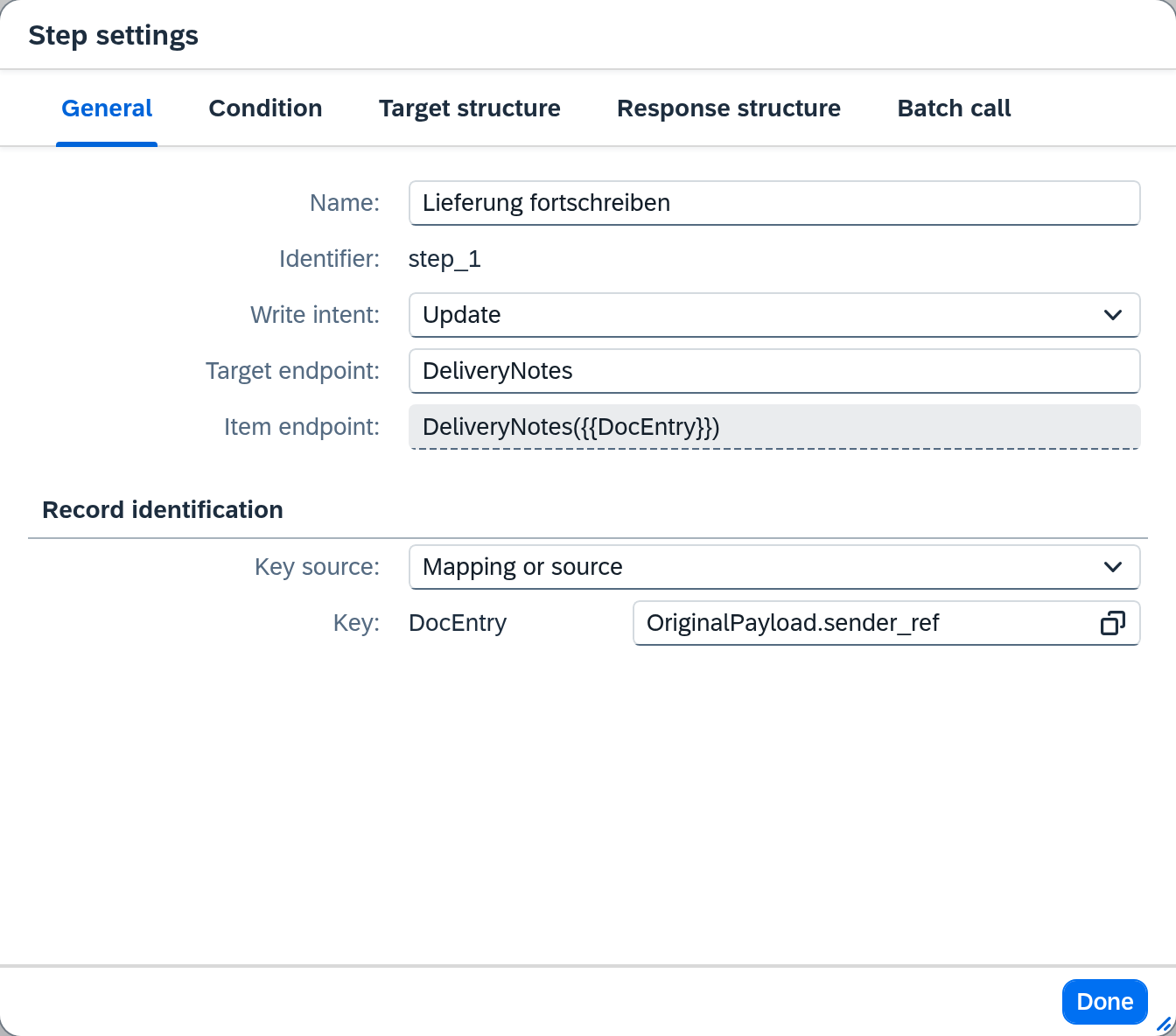
Xchange puts 80234 into the Item endpoint and changes exactly this delivery; no lookup in the
target system is needed. How the key source determines the record is described in the core concept
Writing to the target.
Why Update: a status message must never create a delivery. If the delivery does not exist, the job ends as Skipped (not present). Create or update would create a new document in this case.
3. Map the message
The mapping says what is written into the delivery. For "Transport Kessler", that is two rows:
U_Lieferstatus with the fixed value UNTERWEGS and U_LetzterOrt from
OriginalPayload.location.
sender_ref itself has no mapping row: the value serves only to address the delivery.
4. Check in the test area
- On the Mapping tab, choose the Test panel button.
- Use Kessler's sample message as the test message.
- Choose Run test.
The result shows U_Lieferstatus with UNTERWEGS and U_LetzterOrt with
Verteilzentrum Hannover. The test shows only the mapping; writing to the target system happens
only in operation. Whether the delivery is hit is shown by the first job.
5. Activate
Your changes are in the draft. Validate it and activate it; only then do the responses write into their delivery. The way there is described in Validate and activate.
When a message does not find its document
If the message lacks sender_ref, the step cannot determine which delivery to change: the job
aborts and ends up in Clarification as Target address unresolvable. Check whether the partner
returns the value, as agreed. How to resolve the case is described in
Resolve a clarification.
If there is no delivery for this key, the job ends as Skipped (not present) and appears only in History. Check there whether the delivery exists in SAP Business One and the value in the message is correct.
What comes next
- The other three message types address the delivery the same way: set up "Abholung Kessler", "Zustellung Kessler" and "Fehlzustellung Kessler" identically — only the mapping differs.
- You want to see which message updated which delivery: Find and trace a single job.
See also
- Routes — Mapping (reference) — all fields of the step settings
- Clarification (reference) — all causes and what they mean
- Writing to the target (core concept) — write intent, key source and what happens with zero, one or several matches