Build a target field from several source values
Kessler supplies both Cambira companies. In CAMBIRA_DE and CAMBIRA_AT, the document numbers run
independently of each other, so 80234 can occur twice at Kessler. In the field reference,
Kessler therefore requires an order reference that carries the company along: CAMBIRA_DE-80234.
This value only arises in the mapping, from two parts — a fixed text and a field.
This guide builds this row in the route "Lieferaufträge Kessler". At the end, the
test result shows CAMBIRA_DE-80234 where the field was empty before.
What you need
- The Routes permission at the level Full. See Permissions.
- A route with a mapping. This guide creates one row.
- Starting point: Configuration → Routes, select the route, Mapping tab.
Xchange saves every input automatically. In operation, it takes effect only with the activated configuration snapshot — that is step 3.
1. Two parts into one value
-
On the Mapping tab, choose the Add Row button. An empty row appears.
-
In the Target field column, enter
reference. -
In the same row, choose the gear. The settings of the row open.
-
On the Transformation tab, add a transformation via the plus sign and in the selection field below it choose Concatenate. The selection is sorted by groups; Concatenate is under String.
-
Below it, the Parts section appears. Via Add part, create two:
Part Kind Value 1 fixed value CAMBIRA_DE-2 field of the source OriginalPayload.DocNum -
Each part carries an icon on the left that switches between a field of the source and a fixed value. For the first part, set it to the fixed value; for the second, to the field.
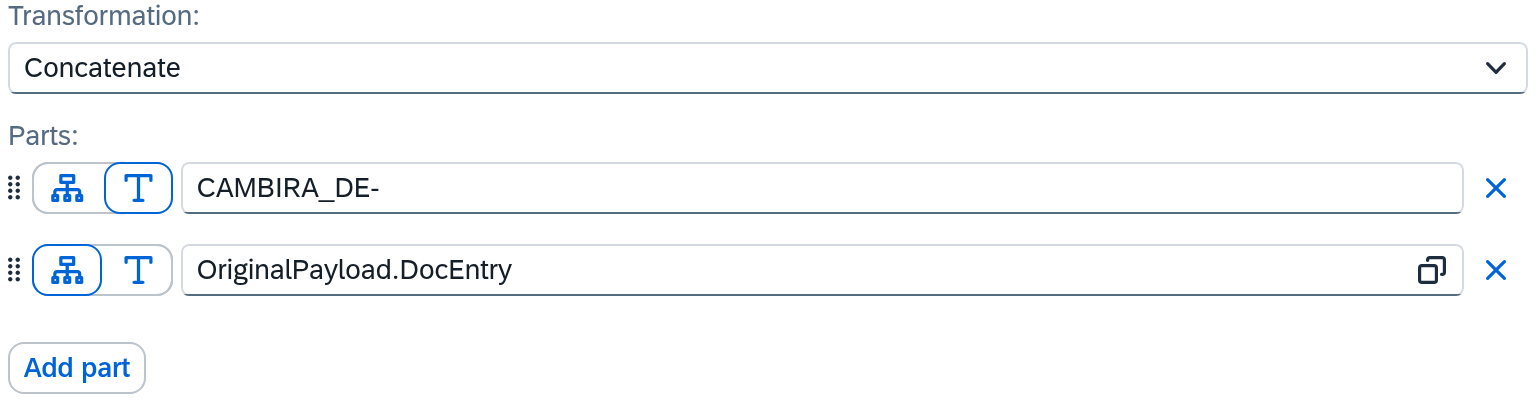
The order of the parts is the order in the result. They can be moved with the mouse;
Remove part takes one out again. You write a separator into
the fixed text: the minus sign in CAMBIRA_DE- belongs to it.
Concatenate must be in first place in the transformation chain. The transformation produces the value itself instead of reshaping one that was brought along; whatever comes after it continues working with the result.
2. Check in the test area
Before you activate, look at what comes out.
- On the Mapping tab, choose the Test panel button.
- Paste a sample message — a delivery with
DocNum80234. - Choose Run test.
The result shows reference with CAMBIRA_DE-80234. A test only displays the result; the
target system stays untouched. So you can use it on a running route too.
3. Activate
Your change is in the draft. Validate it and activate it; only then does the route write the field. The way there is in Validate and activate.
When a part is empty
A delivery without DocNum is unlikely. With two fields — an address made of street and
house number, for example — the case is an everyday one.
An empty field part drops out and takes the fixed text next to it along. So from
CAMBIRA_DE- and an empty DocNum, instead of CAMBIRA_DE-, you get an empty value. That is
intentional: a fixed text between two fields is usually a separator, and a separator
without the field after it yields a value with a remainder at the end, which the target system then rejects.
If an empty value remains at the end, the row counts as empty — and only then do fallback value and empty behavior come into play at all.
This only shows in the test. When you concatenate fields that can be empty, try the case in the test area: a sample message without the field in question.
A field that the source does not deliver at all
The part CAMBIRA_DE- is a fixed value on a small scale. Sometimes the whole target field
is one — an identifier of the sender, a fixed document type, a flag that is the same for every
record. For this, a fixed value in the row itself is enough.
- Create the row and enter the Target field.
- In the Source column, switch the icon on the left: a fixed value instead of a field reference.
- Enter the value. Below it, the Value type field appears with Text, Number and Boolean — it defines as what kind of value it arrives in the target system; its spelling stays unaffected.
For a row set up like this, the Empty source value tab is omitted: a fixed value always arrives filled.
When another field should step in
The route "Zustellung Kessler" writes U_Empfaenger from OriginalPayload.signed_by. If a
parcel is left without a signature, the field arrives empty and U_Empfaenger would stay empty.
- In the settings of the row, switch to the Empty source value tab.
- Switch on Use fallback value.
- In the Fallback value field, enter the value that should step in — here
ohne Unterschrift. Here too, the icon on the left switches between a fixed value and a field of the source — so the fallback may also be a second field.
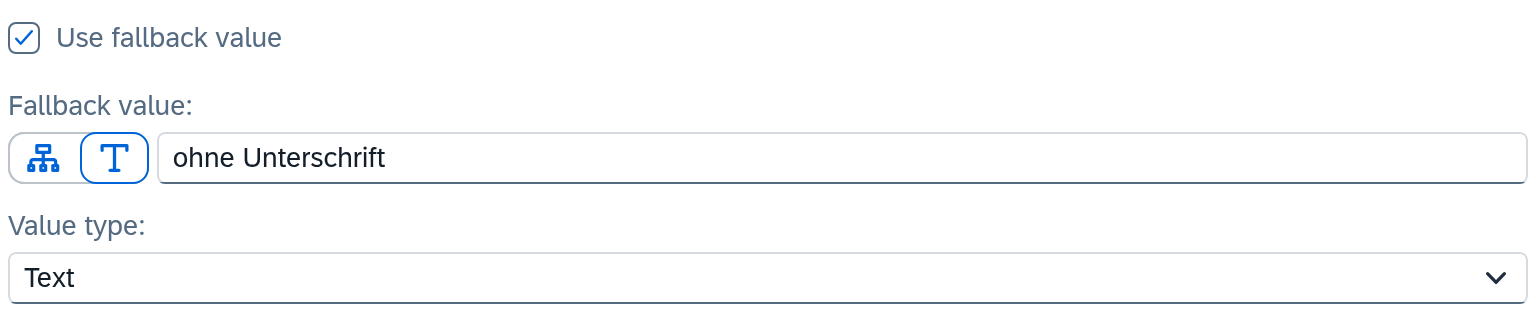
The fallback value depends on the outcome of the row. Xchange first reads the source, then works through the transformations and checks afterwards whether anything is left. A row whose source field was filled and whose transformation produced an empty value thus gets the fallback value too. The fallback value itself may carry its own transformation chain.
If it stays empty even after that, the Empty behavior decides — the field is on the same
tab, below the fallback value. For U_Empfaenger, it stays at the default Transfer
unchanged; the field then goes out empty. The two other settings and the case in which the
difference matters are under Routes — Mapping.
When several values are candidates
A fallback value is one second attempt. Kessler prints addressLine1 on the label, at most 30
characters, and takes the first address there is: the parcel locker, otherwise street and house
number of the ship-to address, otherwise those of the bill-to address. That is three attempts, and
two of them are only composed first.
-
On the Transformation tab, choose First available value via the plus sign. The function is under Lookup.
-
Two alternatives are already in place; add the third via Add alternative:
Alternative Value Transformation 1 field OriginalPayload.Packstation— 2 — Concatenate: ShipToStreet,ShipToStreetNo3 — Concatenate: BillToStreet,BillToStreetNo -
You open an alternative's transformation with Edit transformation at the end of its row. There you build Concatenate as in step 1 of this guide; Back returns to the list.
-
On the Transformation tab, add a second station Substring after First available value that cuts to 30 characters. It applies to whichever alternative wins.
The first alternative that yields a value is used. The order of the list is the order of the check; you change it by moving a row by its handle. An alternative is empty when its field is missing, carries a null value or an empty text — judged after its own transformation. Three cases follow from this that you should try in the test area:
- If only the street is missing, alternative 2 yields the house number alone, e.g.
5. It is not empty and wins; the bill-to address no longer gets its turn. - A space is a value. If the parcel locker arrives as
- An aggregation is never empty. Count and Sum yield
0on an empty list, and0is a value — such an alternative always wins and therefore belongs at the end.
If no alternative yields anything, the Empty behavior decides. First available value has no Fallback value: whatever should step in, you add as the last alternative.
Where a fallback value would be wrong
The route "Bestellungen Webshop" writes CardCode from OriginalPayload.customer_no and has marked the
row as Required. Order WS-2026-104861 came in without customer_no, the
mapping aborted, and the job is in Clarification, cause Required field has no
value.
A fallback value would be the worse solution here. It would enter a foreign business partner — the order would be in SAP Business One under the wrong customer, and the error would go unnoticed. The abort is the right behavior: it holds on to the case while someone can still decide it.
As a rule of thumb: a fallback value works where a missing value is a gap — a missing signature on delivery. Where the value says to whom the record belongs, the abort is right.
What comes next
- If the target system rejects because a field is missing that the mapping does not know: A field is missing from the mapping.
- If a value should be translated instead of composed: Convert and translate values.
See also
- Routes — Mapping (reference) — the mapping row and all transformations
- Clarification (reference) — where an aborted job lands
- Mapping (core concept) — why a route has steps and in which order it writes