Convert and translate values
The webshop sends the payment method as paypal, invoice or card. SAP Business One keeps the
codes PP, RG and KK in PaymentMethod. Untranslated, paypal lands in the target field as
it is — the source value is taken over unchanged.
This guide creates the value table "Zahlungsarten Webshop" and attaches it to the mapping row of
the route "Bestellungen Webshop" that writes OriginalPayload.payment to PaymentMethod. At the
end, the test result shows PP where it showed paypal before.
What you need
- Two permissions, both at the Full level: Mapping for the value table and Routes for the mapping row. The way leads across two screens, and each depends on its own permission. See Permissions.
- A route with a mapping in which the field is already mapped. This guide changes an existing row.
- Starting point: Configuration → Value Tables.
Xchange saves every entry automatically. In operation, it takes effect only with the activated configuration snapshot — that is step 5.
1. Create the value table
-
Open Configuration → Value Tables.
-
Select New Value Table. The dialog asks only for the Name field; enter
Zahlungsarten Webshopand select Create. -
The new table is open on the right. Under General, you can add a Description — it is included in the search and pays off as soon as several tables sit side by side.
-
In the Entries section, select Add entry (on the right in the header) three times and enter the pairs:
Source value Target value paypalPPinvoiceRGcardKK
The comparison is exact to the character: PayPal and paypal are two different values.
Enter the source value exactly as the foreign system sends it.
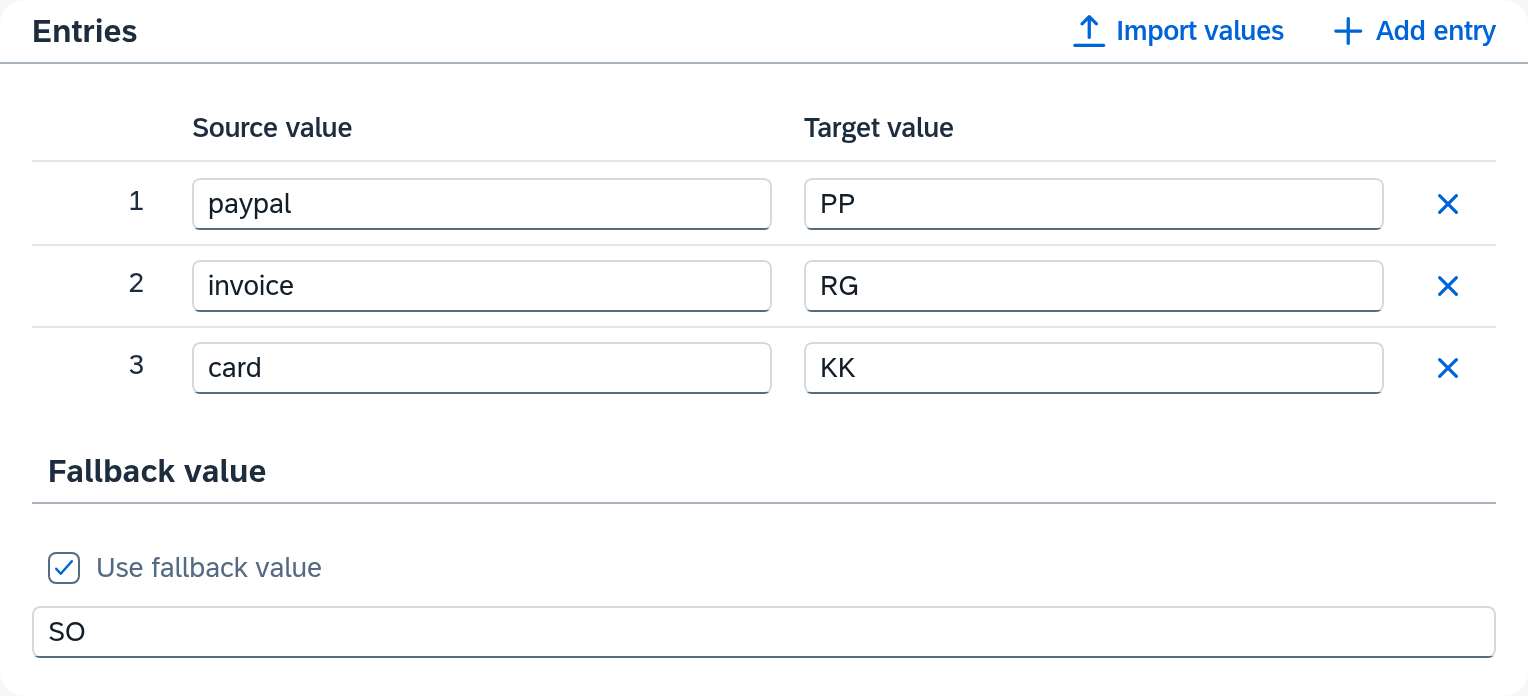
What the individual fields of this screen mean is described in Value Tables.
2. Many values at once
Longer lists — e.g. a country list — you import:
- Select Import values.
- Either select a file or paste the content into the field below — one pair per line.
- The separator is detected automatically: tab, semicolon or comma.
- The preview shows what arrives. The summary is below it.
Under Import behavior, you choose between Merge and Replace. Replace discards the previous content, the fallback value included — a file without a fallback value line thus deletes it. Merge also keeps what exists only in the table.
3. Point the mapping row to the table
Now to the route.
- Configuration → Routes, select the route "Bestellungen Webshop", Mapping tab.
- In the mapping table, find the row that writes
PaymentMethodand select the gear there. The row's settings open. - The Transformation tab first shows the hint that no transformation is set and the source value is taken over unchanged. Add one with the plus sign on the right.
- In the selection field below, choose Value tables. The selection is sorted by groups; Value tables is under Lookup.
- The Value table field appears below. Choose
Zahlungsarten Webshopthere.
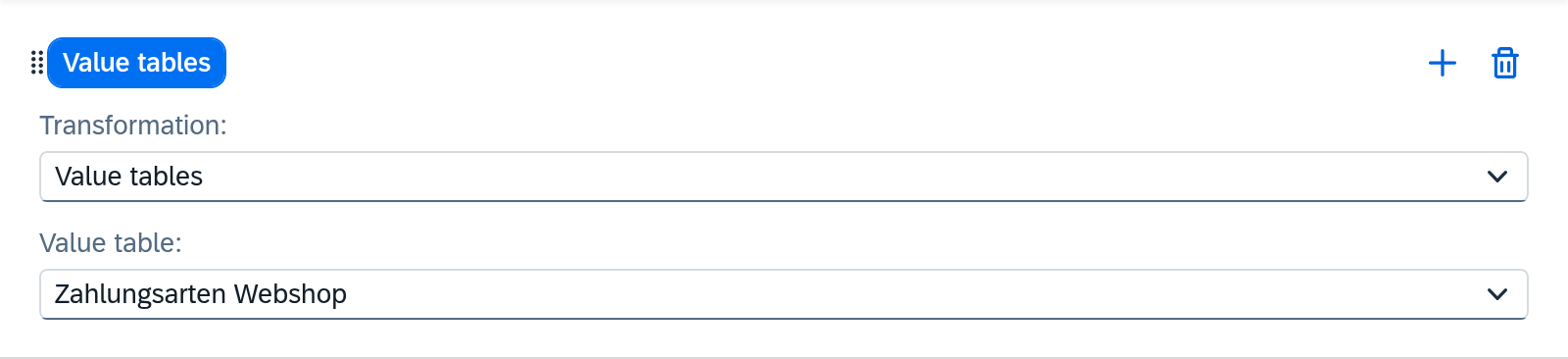
One row carries several transformations in sequence. Each plus sign appends another link, and the order of the links is the order of execution — you can drag them with the mouse. One is enough for this task. Which other transformations exist is described in Routes — Mapping.
The value table must be created beforehand: the Value table field offers only the existing ones for selection.
4. Check in the test panel
Before you activate, look at what comes out.
- On the Mapping tab, select the Test panel button.
- Paste a sample message — one with
"payment": "paypal". - Select Run test.
The result shows PaymentMethod with PP. A test only displays the result; the target
system stays untouched. So you can also use it on a running route.
5. Activate
Your changes are in the draft — the value table as well as the mapping. Check it and activate it; only then does the route translate. The way there is described in Validate and activate.
The value is not in the table
The webshop introduces a fourth payment method and sends applepay. It is missing from the table.
By default, Xchange then leaves the target field empty instead of taking over the value
unchanged. The value table's fallback value helps here: in the Fallback value section, turn on
the Use fallback value setting and enter the value that an unknown source value should get — in
the example SO for "Sonstige". Every value missing from the table thus becomes SO.
The word appears in two places, and they mean different things.
- The value table's fallback value steps in when a value is there but is missing from the
table —
applepay. - The fallback value for an empty source value steps in when the value itself is missing. It is in the mapping row's settings on the Empty source value tab.
So for an order that lacks the payment field, the second fallback value decides — even before the
value table gets its turn.
When a table is not enough
The value table answers one question: which target value belongs to this one source value? It reads one field and writes a fixed value.
If the decision depends on several fields, or if the target value itself is to come from the source, the Conditional value mapping transformation is the tool. It is an ordered series of cases:
- Each case has an If — a condition over any field of the source, with at most 3 groups (see Routes — Mapping) — and a Then use.
- Then use takes a fixed value or a field of the source. Via Edit transformation, the value can carry its own transformation, e.g. Concatenate from street and house number.
- Otherwise catches everything else, also with its own transformation.
The order decides: the first case whose condition applies wins; the check ends with it. That is why cases can be moved by their handle.
As a rule of thumb: the same source value always yields the same target value — value table. The target value depends on more than one field or comes from the data itself — conditional value mapping. In between lie a few fixed cases over a single field: they work either way — as a value table that you maintain on its own and import as a file, or as a conditional value mapping whose cases sit directly in the mapping.
What comes next
- If a target field is to be built from several source values instead of translating one: Build a target field from several source values.
- If the target system rejects because a field is missing that the mapping does not know: A field is missing from the mapping.
See also
- Value Tables (reference) — all fields of the screen, import and deletion
- Routes — Mapping (reference) — the mapping row and all transformations
- Mapping (core concept) — why a route has steps and in which order it writes